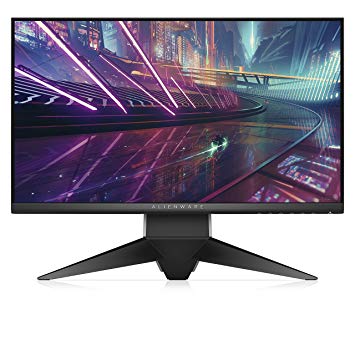
24.5" Dell Alienware AW2518HF مقاييس أداء مراقبة الألعاب
للتعويض عن الألعاب التي تتطلب رسومًا بيانية ، يتمتع Dell Alienware AW2518HF بمعدل تحديث منخفض للغاية جيد للغاية قدره 30 هرتز يمكنه التكيف مع المزيد من انخفاض معدل الإطارات. مع دعم AMD FreeSync ، تكون هذه الشاشة متوافقة مع كل من بطاقات الرسومات AMD و NVIDIA. الشاشة لديها جبل VESA. بالنسبة لمعدلات الإطارات السريعة للغاية ، لدى Dell Alienware AW2518HF معدل تحديث أقصى يبلغ 240 هرتز والذي يسمح باللعب بطريقة أكثر سلاسة. فيما يتعلق بكثافة البكسل ، Dell Alienware AW2518HF بها كثافة ممتازة 89 بكسل لكل بوصة ، مما ينتج عنه جودة نص وصورة أكثر حدة. بالنسبة لمتوسط معدل الاستجابة ، تسجل Dell Alienware AW2518HF الدرجات 4 ms ، مما يضمن التزامن الفعال مع معدل التحديث العالي. سطوع Dell Alienware AW2518HF أفضل بكثير من الشاشات الأخرى. الحد الأدنى لمعدل الاستجابة Dell Alienware AW2518HF هو 1 مللي ثانية ، وهو ما يلغي آثار الظلال. يحتوي Dell Alienware AW2518HF على منفذ العرض وهذا ضروري لبطاقات NVIDIA للعمل مع AMD FreeSync. Dell Alienware AW2518HF شاشة جديدة نسبيا. Dell Alienware AW2518HF تأخر إدخال كلي قدره 13.5 ms ، وهو أمر ممتاز بين المنافسة. تستخدم الشاشة لوحة TN التي تعاني من تغيير اللون عند عرضها من الزوايا الأفقية والرأسية وتم غسلها قليلاً مقارنةً بألواح IPS و VA. تحتوي الشاشة على نسبة تباين غير مبهرة من 1000 : 1. بالنسبة لجودة ألوان الرسومات ، يحتوي Dell Alienware AW2518HF على متوسط عمق ألوان يبلغ 6 -bit ، مما ينتج عنه تدرجات متدرجة وألوان أقل دقة قليلاً.
24.5" Dell Alienware AW2518HF Brand, series, model
Brand
Dell
Model
Alienware AW2518HF
24.5" Dell Alienware AW2518HF Camera
Camera
No
24.5" Dell Alienware AW2518HF Connectivity
Connectivity
1 x USB 3.0 (upstream) , 3 x USB 3.0 (downstream) , 1 x USB 3.0 (charge - 5V/1.5A) , 2 x HDMI 2.0, 1 x DisplayPort 1.2, 1 x 3.5 mm Audio In, 1 x 3.5 mm Audio Out
24.5" Dell Alienware AW2518HF Dimensions, weight and color
Colors
BlackSilver
Depth
64.6 mm (millimeters) 6.46 cm (centimeters) 2.5433 in (inches) 0.2119 ft (feet)
Depth with stand
268.6 mm (millimeters) 26.86 cm (centimeters) 10.5748 in (inches) 0.8812 ft (feet)
Height
327.9 mm (millimeters) 32.79 cm (centimeters) 12.9094 in (inches) 1.0758 ft (feet)
Height with stand
418.4 mm (millimeters) 41.84 cm (centimeters) 16.4724 in (inches) 1.3727 ft (feet)
Weight
3.38 kg (kilograms) 7.45 lbs (pounds)
Weight with stand
6.9 kg (kilograms) 15.21 lbs (pounds)
Width
555.8 mm (millimeters) 55.58 cm (centimeters) 21.8819 in (inches) 1.8235 ft (feet)
Width with stand
555.8 mm (millimeters) 55.58 cm (centimeters) 21.8819 in (inches) 1.8235 ft (feet)
24.5" Dell Alienware AW2518HF Display
Aspect ratio
1.778:116:9
Average response time
4 ms (milliseconds) 0.0040 s (seconds)
Backlight
W-LED
Brightness
400 cd/m² (candela per square meter)
Coating
Anti-glare/Matte (3H)
Colors
16777216 colors 24 bits
Diagonal
622.3 mm (millimeters) 62.23 cm (centimeters) 24.5 in (inches) 2.0417 ft (feet)
Display area
90.29 % (percent)
Dynamic contrast
50000000 : 1
FRC
Yes
Height
302.616 mm (millimeters) 30.2616 cm (centimeters) 11.914 in (inches) 0.9928 ft (feet)
Horizontal viewing angle
170 ° (degrees)
Minimum response time
1 ms (milliseconds) 0.0010 s (seconds)
NTSC (1953)
72 % (percent)
Panel bit depth
8 bits (6 bits + FRC)
Panel manufacturer
AU Optronics
Panel model
M250HTN01.0
Panel type
TN
Pixel density
89 ppi (pixels per inch) 35 ppcm (pixels per centimeter)
Pixel pitch
0.283 mm (millimeters) 0.0283 cm (centimeters) 0.0111 in (inches) 0.0009 ft (feet)
Resolution
1920 x 1080 pixels Full HD / 1080p
Size class
24.5 in (inches)
Static contrast
1000 : 1
Vertical viewing angle
160 ° (degrees)
Width
543.744 mm (millimeters) 54.3744 cm (centimeters) 21.4072 in (inches) 1.7839 ft (feet)
24.5" Dell Alienware AW2518HF Ergonomics
Backward tilt
25 ° (degrees)
Forward tilt
5 ° (degrees)
Forward/backward tilt
Yes
Height adjustment
Yes
Height adjustment range
130 mm (millimeters) 13 cm (centimeters) 5.1181 in (inches) 0.4265 ft (feet)
Landscape/portrait pivot
Yes
Left pivot
90 ° (degrees)
Left swivel
20 ° (degrees)
Left/right swivel
Yes
Removable stand
Yes
Right pivot
90 ° (degrees)
Right swivel
20 ° (degrees)
VESA interface
100 x 100 mm
VESA mount
Yes
24.5" Dell Alienware AW2518HF Features
Features
AMD FreeSync technology, Flicker-free technology,
24.5" Dell Alienware AW2518HF Frequencies
Horizontal frequency (digital)
30 kHz - 291 kHz (kilohertz)
Vertical frequency (digital)
30 Hz - 240 Hz (hertz)
24.5" Dell Alienware AW2518HF Operating and storage conditions
Operating altitude
5000 m (meters) 16404.2 ft (feet)
Operating humidity
10 % - 80 % (percent)
Operating temperature
0 °C - 40 °C (degrees Celsius) 32 °F - 104 °F (degrees Fahrenheit)
Storage altitude
12192 m (meters) 40000 ft (feet)
Storage humidity
5 % - 90 % (percent)
Storage temperature
-20 °C - 6 °C (degrees Celsius) -4 °F - 42.8 °F (degrees Fahrenheit)
24.5" Dell Alienware AW2518HF Power supply and consumption
110V
100 V - 120 V (volts)
220V
220 V - 240 V (volts)
Alternating current frequency
50 Hz - 60 Hz (hertz)
Electric current (A)
1.5 A (amperes)
Energy efficiency class
B
Power consumption (average)
26 W (watts)
Power consumption (maximum)
73 W (watts)
Power consumption (off)
0.3 W (watts)
Power consumption (sleep)
0.3 W (watts)
24.5" Dell Alienware AW2518HF مقاييس أداء مراقبة الألعاب - List of Max Refresh Rate Compatible GPUs
Alienware AW2518HF calibration settings wanted!
In the review of the Alienware AW2518H, it says that they calibrated the monitor to offer better colors but i can"t seem to find the exact settings that they used.
If someone has the exact setttings pls share them with me.
When you go to custom color you have 4 options that you can modify:
Gain, Offset, Hue, Saturation.
00
V
v.mydlar997 years ago
ALIENWARE AW2518HF not showing 240hz but only 144hz
ALIENWARE AW2518HF not showing 240hz but only 144hz with DP 1.2 monitor and my GTX 770 supports it.
00
G
Glenwing7 years ago
Can you download the custom resolution utility, find the 1080p 240 Hz listing, click edit, and show me the settings?
It might be inside the CEA extension block, like this:
EDIT: According to the manual, the 1920 × 1080 @ 240 Hz mode runs at a 594 MHz pixel clock, which is beyond the 540 MHz limit of the GTX 770.




























ما النظر قبل شراء بطاقة الرسومات
إذا كنت تخطط لترقية النظام الخاص بك عن طريق شراء بطاقة رسومات جديدة. ثم هناك بعض العوامل الهامة للنظر فيها.
جودة القرار الجودة: التأثير على أداء اللعبة
ما يؤثر على أداء اللعبة؟ الوضوح أو التفاصيل؟
إعدادات Ultra VS High Quality في ألعاب الكمبيوتر الشخصي
كل لاعب لديه فكرة مختلفة حول الإعداد المثالي لألعاب الكمبيوتر. ولكن في معظم الحالات ، يعد اختيار تهيئة رسومات عالية الجودة هو الطريق المناسب.
ما هي المعامِلات CPU أو GPU؟
هل تحصل على قطرات إطار مفاجئ؟ قد يكون لديك عنق الزجاجة.
ما هي سرعة FPS المقبولة بالنسبة لي؟
بالنسبة إلى بعض الألعاب ، لا يزال بإمكانك الاستمتاع بحفل كبير في أسعار الإطارات المنخفضة.
GPU Hierarchy
GPU Compare
CPU Compare
Gaming Laptops
Gaming Monitors
Gaming Headsets
مناقشة وتعليقات
شارك تعليقاتك
In the review of the Alienware AW2518H, it says that they calibrated the monitor to offer better colors but i can"t seem to find the exact settings that they used.
If someone has the exact setttings pls share them with me.
When you go to custom color you have 4 options that you can modify:
Gain, Offset, Hue, Saturation.
ALIENWARE AW2518HF not showing 240hz but only 144hz with DP 1.2 monitor and my GTX 770 supports it.
Can you download the custom resolution utility, find the 1080p 240 Hz listing, click edit, and show me the settings?
It might be inside the CEA extension block, like this:
EDIT: According to the manual, the 1920 × 1080 @ 240 Hz mode runs at a 594 MHz pixel clock, which is beyond the 540 MHz limit of the GTX 770.