Testy wydajności monitora gier 27" ViewSonic XG2701
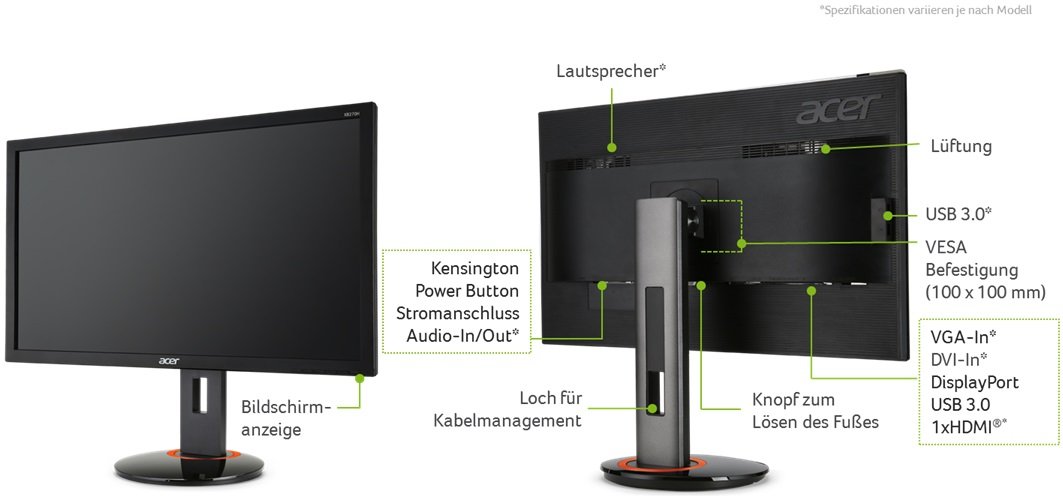
ViewSonic XG2701 ma port wyświetlacza i jest to niezbędne dla kart NVIDIA do współpracy z AMD FreeSync. Dla ekstremalnie szybkich częstotliwości klatek ViewSonic XG2701 ma maksymalną częstotliwość odświeżania 144 Hz, która umożliwia płynniejszą rozgrywkę. Monitor ma mocowanie VESA. Dzięki obsłudze AMD FreeSync monitor ten jest zgodny zarówno z kartami graficznymi AMD, jak i NVIDIA. Dla średniego współczynnika odpowiedzi ViewSonic XG2701 wyniki 5 ms, które zapewniają skuteczną synchronizację z wysoką częstotliwością odświeżania. Aby zrekompensować wymagające graficznie gry, ViewSonic XG2701 ma bardzo dobrą adaptacyjną częstotliwość odświeżania dla niskich częstotliwości 24 Hz, która może dostosować się do mniejszych spadków szybkości klatek. Minimalny wskaźnik odpowiedzi ViewSonic XG2701 to 1.38 ms, co eliminuje efekty zjawy. Monitor korzysta z panelu TN, który ma przesunięcia kolorów podczas oglądania z kątów poziomych i pionowych oraz ma lekko wyprane kolory w porównaniu z panelami IPS i VA. Jasność ViewSonic XG2701 jest niższa niż innych monitorów. W przypadku jakości kolorów graficznych ViewSonic XG2701 ma średnią głębię kolorów 6 -bit, co powoduje, że gradienty są nieco zaciemnione i kolory są nieco mniej dokładne. Warto zauważyć, że ViewSonic XG2701 to stosunkowo stary monitor. Monitor ma imponujący współczynnik kontrastu 1000 : 1. ViewSonic XG2701 ma całkowite opóźnienie wejściowe wynoszące 15.5 ms, co jest złe w konkurencji. Pod względem gęstości pikseli ViewSonic XG2701 ma niską gęstość 81 pikseli na cal, co powoduje piksele tekstu i jakości obrazu.
27" ViewSonic XG2701 Certificates, standards and licenses
Certificates, standards and licenses
BSMICBCCCCE EMCCEL Level 1cETLusENERGY STAR 6.0Epeat SilverErPeStandbyFCC Class BICES-003PSEREACH SVHC List & DoCRoHS Green BOMVCCIWEEE
27" ViewSonic XG2701 Connectivity
Connectivity
2 x USB 2.0, 1 x USB 2.0 (upstream) , 2 x USB 3.0 (downstream) , 2 x HDMI 1.4, 1 x DisplayPort 1.2, 1 x DisplayPort 1.2 (Input mini) , 1 x 3.5 mm Audio Out
27" ViewSonic XG2701 Dimensions, weight and color
Colors
Black
Depth
64.3 mm (millimeters) 6.43 cm (centimeters) 2.5315 in (inches) 0.211 ft (feet)
Depth with stand
231 mm (millimeters) 23.1 cm (centimeters) 9.0945 in (inches) 0.7579 ft (feet)
Height
391 mm (millimeters) 39.1 cm (centimeters) 15.3937 in (inches) 1.2828 ft (feet)
Height with stand
433.6 mm (millimeters) 43.36 cm (centimeters) 17.0709 in (inches) 1.4226 ft (feet)
Weight
5.5 kg (kilograms) 12.13 lbs (pounds)
Weight with stand
8.6 kg (kilograms) 18.96 lbs (pounds)
Width
642 mm (millimeters) 64.2 cm (centimeters) 25.2756 in (inches) 2.1063 ft (feet)
Width with stand
642 mm (millimeters) 64.2 cm (centimeters) 25.2756 in (inches) 2.1063 ft (feet)
27" ViewSonic XG2701 Display
Aspect ratio
1.778:116:9
Average response time
5 ms (milliseconds) 0.0050 s (seconds)
Backlight
W-LED
Brightness
300 cd/m² (candela per square meter)
Coating
Anti-glare/Matte (3H)
Colors
16777216 colors 24 bits
Diagonal
685.8 mm (millimeters) 68.58 cm (centimeters) 27 in (inches) 2.25 ft (feet)
Display area
80.03 % (percent)
Dynamic contrast
120000000 : 1
FRC
Yes
Height
336.15 mm (millimeters) 33.615 cm (centimeters) 13.2343 in (inches) 1.1029 ft (feet)
Horizontal viewing angle
170 ° (degrees)
Minimum response time
1.38 ms (milliseconds) 0.0014 s (seconds)
NTSC (1953)
75.4 % (percent)
Panel bit depth
8 bits (6 bits + FRC)
Panel type
TN
Pixel density
81 ppi (pixels per inch) 32 ppcm (pixels per centimeter)
Pixel pitch
0.311 mm (millimeters) 0.0311 cm (centimeters) 0.0123 in (inches) 0.001 ft (feet)
Resolution
1920 x 1080 pixels Full HD / 1080p
Size class
27 in (inches)
Static contrast
1000 : 1
Vertical viewing angle
160 ° (degrees)
Width
597.6 mm (millimeters) 59.76 cm (centimeters) 23.5276 in (inches) 1.9606 ft (feet)
27" ViewSonic XG2701 Ergonomics
Backward tilt
22 ° (degrees)
Forward tilt
5 ° (degrees)
Forward/backward tilt
Yes
Height adjustment
Yes
Height adjustment range
120 mm (millimeters) 12 cm (centimeters) 4.7244 in (inches) 0.3937 ft (feet)
Landscape/portrait pivot
Yes
Left pivot
0 ° (degrees)
Left swivel
175 ° (degrees)
Left/right swivel
Yes
Removable stand
Yes
Right pivot
90 ° (degrees)
Right swivel
175 ° (degrees)
VESA interface
100 x 100 mm
VESA mount
Yes
27" ViewSonic XG2701 Features
Features
AMD FreeSync technology, Black StabilizationFlicker-free technology, SmartSync technology,
27" ViewSonic XG2701 Frequencies
Horizontal frequency (digital)
15 kHz - 180 kHz (kilohertz)
Vertical frequency (digital)
24 Hz - 144 Hz (hertz)
27" ViewSonic XG2701 Operating and storage conditions
Operating humidity
20 % - 90 % (percent)
Operating temperature
0 °C - 40 °C (degrees Celsius) 32 °F - 104 °F (degrees Fahrenheit)
27" ViewSonic XG2701 Power supply and consumption
110V
100 V - 120 V (volts)
220V
220 V - 240 V (volts)
Alternating current frequency
50 Hz - 60 Hz (hertz)
Power consumption (average)
29 W (watts)
Power consumption (eco)
23 W (watts)
Power consumption (maximum)
35 W (watts)
Testy wydajności monitora gier 27" ViewSonic XG2701 - List of Max Refresh Rate Compatible GPUs
Using a Viewsonic XG2701 monitor on a gtx 1070ti. any problem?
i have Palit gtx 1070 ti super jestream. and i want i 144hz gaming monitor. i saw that all the 144hz monitor with good value (cheap) are with freesync. in my region.. and i saw the viewsonic xg2701. i want to buy that monitor. but before i buy it. i want to ask if there is any problem using it with a gtx 1070ti?
is there a performance loss if i use that monitor? compare to a monitor without a freesync 144hz?
00
S
ShadyHamster7 years ago
The monitor will function perfectly fine with a nvidia gpu.
My current monitor has freesync and is working perfectly fine with my 1070 ti, i do miss adaptive sync though.
00
S
symphonicmind9 years ago
BENQ GW2765HT VS Viewsonic XG2701 (IPS 1440p VS TN 144hz)
Hi to all.
Recently I bought a MSI GTX 980 Gaming 4G and I would like to upgrade my 24" 60hz LCD Viewsonic monitor to a better one for gaming.
Im in between the GW2765HT (IPS 1440p) and the XG2701 (TN 144hz). I was looking at the Dell S2716DG but right now is a little expensive for my budget.
I dont play to much FPS (For now just Crysis 3 campign). My list of games for now are, Diablo 3, SC2, Evil Within, Skyrim, Lords of the Fallen, Dark Souls 2 and Witcher 3.
So any suggestion on which monitor should I get between those 2? Or should I just save more money and get the Dell with g-sync(if it does really worth it)?
Thanks a lot
00
_
_JakeDavies9 years ago
The Dell monitor is good monitor but it is still a TN panel. For the type of Games that you are playing, the games will, in my opinion, look better at a constant 60FPS at 1440P. Witcher 3 is very demanding and running it maxed out 1440P you should around 60FPS. An IPS panel is beautiful to look at compared to a TN panel. It's a question of high frame rates with a decent looking panel or a nice smooth, playable frame rate (60 FPS) but a beautiful looking IPS panel that has lots more colours, and deeper blacks.



























































































































Co należy wziąć pod uwagę przed zakupem karty graficznej
Jeśli planujesz uaktualnić swój system, kupując nową kartę graficzną. Następnie należy wziąć pod uwagę kilka ważnych czynników.
Rozdzielczość Jakość VS: wpływ na wydajność gry
Co wpływa na wydajność gry? Klarowność lub szczegóły?
Ustawienia Ultra VS wysokiej jakości w grach komputerowych
Każdy gracz ma inne zdanie na temat idealnego ustawienia gier na PC. Jednak w większości przypadków wybór najlepszej konfiguracji graficznej jest do zrobienia.
Czym są wąskie gardła CPU lub GPU?
Czy otrzymujesz nagłe krople ramki? możesz mieć wąskie gardło.
Jaka jest dla mnie dopuszczalna prędkość FPS?
W przypadku niektórych gier nadal można cieszyć się wspaniałymi garfikami przy niższej liczbie klatek na sekundę.
GPU Hierarchy
GPU Compare
CPU Compare
Gaming Laptops
Gaming Monitors
Gaming Headsets
Dyskusja i komentarze
Udostępnij swoje komentarze
i have Palit gtx 1070 ti super jestream. and i want i 144hz gaming monitor. i saw that all the 144hz monitor with good value (cheap) are with freesync. in my region.. and i saw the viewsonic xg2701. i want to buy that monitor. but before i buy it. i want to ask if there is any problem using it with a gtx 1070ti?
is there a performance loss if i use that monitor? compare to a monitor without a freesync 144hz?
The monitor will function perfectly fine with a nvidia gpu.
My current monitor has freesync and is working perfectly fine with my 1070 ti, i do miss adaptive sync though.
Hi to all.
Recently I bought a MSI GTX 980 Gaming 4G and I would like to upgrade my 24" 60hz LCD Viewsonic monitor to a better one for gaming.
Im in between the GW2765HT (IPS 1440p) and the XG2701 (TN 144hz). I was looking at the Dell S2716DG but right now is a little expensive for my budget.
I dont play to much FPS (For now just Crysis 3 campign). My list of games for now are, Diablo 3, SC2, Evil Within, Skyrim, Lords of the Fallen, Dark Souls 2 and Witcher 3.
So any suggestion on which monitor should I get between those 2? Or should I just save more money and get the Dell with g-sync(if it does really worth it)?
Thanks a lot
The Dell monitor is good monitor but it is still a TN panel. For the type of Games that you are playing, the games will, in my opinion, look better at a constant 60FPS at 1440P. Witcher 3 is very demanding and running it maxed out 1440P you should around 60FPS. An IPS panel is beautiful to look at compared to a TN panel. It's a question of high frame rates with a decent looking panel or a nice smooth, playable frame rate (60 FPS) but a beautiful looking IPS panel that has lots more colours, and deeper blacks.