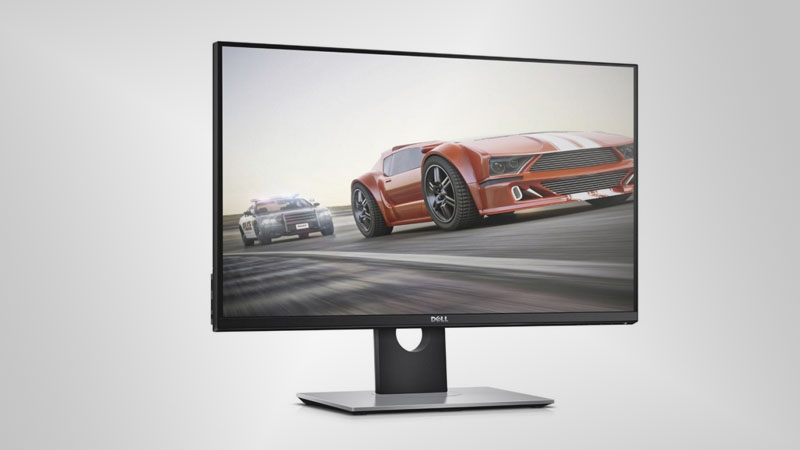
Monitor ma mocowanie VESA. Dell S2716DG ma port wyświetlacza i jest to niezbędne dla kart NVIDIA do współpracy z AMD FreeSync. Pod względem gęstości pikseli Dell S2716DG ma doskonałą gęstość 109 pikseli na cal, co skutkuje ostrzejszą jakością tekstu i obrazu. Dell S2716DG ma całkowite opóźnienie wejściowe wynoszące 11.5 ms, co jest doskonałe wśród konkurencji. Minimalny wskaźnik odpowiedzi Dell S2716DG to 1 ms, co eliminuje efekty zjawy. W przypadku jakości kolorów grafiki Dell S2716DG ma doskonałą głębię kolorów 8 -bit, co zapewnia gładsze gradienty i dokładniejsze kolory. Aby zrekompensować wymagające graficznie gry, Dell S2716DG ma bardzo dobrą adaptacyjną częstotliwość odświeżania dla niskich częstotliwości 30 Hz, która może dostosować się do mniejszych spadków szybkości klatek. Dla ekstremalnie szybkich częstotliwości klatek Dell S2716DG ma maksymalną częstotliwość odświeżania 145 Hz, która umożliwia płynniejszą rozgrywkę. Dla średniego współczynnika odpowiedzi Dell S2716DG wyniki 3 ms, które zapewniają skuteczną synchronizację z wysoką częstotliwością odświeżania. Bez obsługi AMD FreeSync ten monitor nie jest zgodny z kartami graficznymi AMD. Monitor korzysta z panelu TN, który ma przesunięcia kolorów podczas oglądania z kątów poziomych i pionowych oraz ma lekko wyprane kolory w porównaniu z panelami IPS i VA. Jasność Dell S2716DG jest niższa niż innych monitorów. Monitor ma imponujący współczynnik kontrastu 1000 : 1. Warto zauważyć, że Dell S2716DG to stosunkowo stary monitor.
Dell S2716DG – Setup. The simplicity follows through to the S2716DG’s setup. The base attaches to the stand with a single screw, and the stand slots into the rear of the panel and locks in ...
Page 2 Image Quality, Screen Modes, Uniformity and Verdict Review Dell S2716DG – Image Quality The Dell talks a good game, but its factory settings proved a little underwhelming.
The Dell S2716DG is a good monitor for high-res gaming, and it's tastefully appointed too. ... Dell S2716DG G-Sync Gaming Monitor Review. ... The Verdict. The Dell S2716DG has great features that ...
I own those monitors long enough to draw some conclusions. My s2716dg is from early 2016, it's the first revision. My xb241yu is from late 2017 and it's the bmiprz version. So let's go one by one, form most to least important in my opinion. Colors on both monitors: When it comes to color banding, s2716dg is clearly inferior.
Dell S2716DG flickering/screen going black
Hey guys, yesterday I bought a Dell S2716DG monitor and today the screen has started glitching.
Every 5-10minutes the right side of the screen will start flickering. Sometimes it stops after a few seconds, other times the screen goes black. It’s connected to my GTX 1070 by display port (I’ve tried two DP cables, same thing happens) and the refresh rate is set to 144hz.
Here’s a video I took of it happening
https://www.youtube.com/watch?v=RWsDA2pfdQU
Any ideas what could be causing this? (let me know if I need to provide more information, just not sure what is relevant)
00
G
Galber8 years ago
Dell S2716DG Power saving mode
When I try to turn on this monitor it always goes in power save mode (I have a Display Port). I can't access to the main windows page. What can I do? I read that you have to disable deep sleep by pushing the menu button, but when i push it, it gives me only two options: DP or HDMI. I tried with the HDMI cable without any result. Please help me! Thanks in advance
00
T
ThatVietGuy8 years ago
I have the same monitor.
Which button are you pressing to get into the menu? I press the third one from the left and I get into the full menu.
Can you take a picture to demonstrate what you're talking about?
00
J
james1178 years ago
Dell S2716DG or alternative - 27.0" 2560x1440 144Hz - For new gaming PC
I'm splashing out on a new gaming PC (i7 7700k, GTX 1080 etc.) and to top it off I'd really like to get a 2560x1440 display to take advantage of my new hardware. My current setup is a pair of monitors with a Dell AW2310 23" 120Hz TN being my main gaming display and a HP W2408H 24" TFT as my secondary Netflix/other screen. I havn't had a new display since I got the Dell ~ 6 1/2 years ago.
My question is: as someone who has been happy with the quality of these screens which aspects of a new screen will really blow my mind and help me appreciate my new PC? And which screen is going to be best for me.
I want a nice, reliable display that can at least match my 120Hz current main (which will become my secondary), is 2560x1440 and isn't rediculously expensive or garish. I have a budget around £600 which I can push higher if necessary. The closest match I've found so far seems to be the spiritual successor to my current screen - the Dell S2716DG. I don't really like most of the ACER / ASUS screens - not only from the higher reports of bad screens but the fact they insist on using red on everything and if I'm spending this much I want it to look nice.
I'm scared of IPS for the game of chance thats involved in getting a nice screen. I have been happy with TN all this time but is IPS really such a big difference? Is G-sync worth the premium over freesync? If IPS really is that good but the difference between 120 and 144 Hz isn't that big a deal then I was thinking of the ASUS MG279Q (I can easily hide the bit of red at the back)
So, will I be happy with the Dell S2716DG or is there an obviously better option for me to look at?
00
P
pimpin-tl8 years ago
I sent my S2716DG back due to banding and poor colors even after being calibrated. IPS panels are great, they just have an inherit BLB issues, but when not dark, you can't see it.
00
J
jamison_j_b8 years ago
XB271HU vs PG279Q vs S2716DG
I am building a new rig, and I'm starting from scratch (getting new hardware, KB, mouse, monitors, router/switch SOHO, etc.). For the past 24 hours I have been going through and reading forums, watching youtube, and getting all the info I could find, as well as racking my brain. I am looking at a dual monitor setup.
I am looking at the Acer XB271HU, Asus PG279Q, and the Dell S2716DG. In the long scheme, I'm looking for a monitor that supports G-Sync. I will primarily be gaming, but I will also be using virtualization (VMware Workstation), reading e-books (primarily IT related), and transcoding A/V (DVDs and Blu-Rays). All of these things can be done with either a TN or IPS panel. I love the idea of a IPS panel, but the flickering, dead pixels, and IPS glow have me very concerned. I do know that Acer and Asus both have bad quality control. I also read that the Acer XB271HU uses a better panel from AUO and hence has less IPS glow (don't know how true that is).
At first the Dell S2716DG seemed like a safe bet, and I was about to pull the trigger, but I wanted to get user experiences (in 2017) first. I also know that all three companies have horrendous customer service.
Right now I'm using a Acer P235H, been using that for 8 years with no issues. So I am use to regular TFT LCD, but dear god IPS looks good (minus losing the display lottery, which also makes me hesitate on Acer and Asus)
Am I safe going with Acer or Asus (and which according to user experience), or should I go with the Dell?
00
M
mutlubaris9 years ago
Asus PG278Q vs Dell S2716DG
So I'm going to buy a new monitor for gaming, will probably change my gtx970 gpu with a gtx1080 as well. I've done some research and visited a store to check out the difference between some gaming monitors and I'm definitely going for a monitor with a TN panel, 1440p resolution, high refresh rate, low response time and g-sync. I'm currently stuck between the Asus PG278Q and the Dell S2716DG. In my country (Turkey) the Dell model is around 100 dolars cheaper than the Asus. In most lists the Asus is considered the best gaming monitor, yet in some forums people say that the Dell is the better choice. What do you guys think?
Edit: I'm open for other suggestions as well of course. I'm aware that these aren't the only two monitors that people consider for a gaming setup.
00
I
Iver Hicarte9 years ago
Is the Dell S2716DG Monitor 4K Capable??
so as you can see in the title, can the dell s2716dg monitor support 4k???
I just upgraded my GPU to a GTX 980 ti (is on the way) and now I'm on the move to upgrade my monitor from my dual setup of Viewsonic VX2450WM 60Hz 1080p.
Both monitors are perfect, but Im sure this GPU is overkill for what I have now, and I really would like to upgrade to 1440p.
I have never played on an IPS or 144Hz so Im not sure which way to go from those 2 options. Most of my games are single player (evil within, skyrim, witcher 3, dark souls, Metal gear V, Age of wonders, Diablo 3) but I also play some multiplayer games (SC2 and I will buy Overwatch for sure).
The S2716DG is around 100 USD more than the U2715H.






















Co należy wziąć pod uwagę przed zakupem karty graficznej
Jeśli planujesz uaktualnić swój system, kupując nową kartę graficzną. Następnie należy wziąć pod uwagę kilka ważnych czynników.
Rozdzielczość Jakość VS: wpływ na wydajność gry
Co wpływa na wydajność gry? Klarowność lub szczegóły?
Ustawienia Ultra VS wysokiej jakości w grach komputerowych
Każdy gracz ma inne zdanie na temat idealnego ustawienia gier na PC. Jednak w większości przypadków wybór najlepszej konfiguracji graficznej jest do zrobienia.
Czym są wąskie gardła CPU lub GPU?
Czy otrzymujesz nagłe krople ramki? możesz mieć wąskie gardło.
Jaka jest dla mnie dopuszczalna prędkość FPS?
W przypadku niektórych gier nadal można cieszyć się wspaniałymi garfikami przy niższej liczbie klatek na sekundę.
GPU Hierarchy
GPU Compare
CPU Compare
Gaming Laptops
Gaming Monitors
Gaming Headsets
Dyskusja i komentarze
Udostępnij swoje komentarze
Hey guys, yesterday I bought a Dell S2716DG monitor and today the screen has started glitching.
Every 5-10minutes the right side of the screen will start flickering. Sometimes it stops after a few seconds, other times the screen goes black. It’s connected to my GTX 1070 by display port (I’ve tried two DP cables, same thing happens) and the refresh rate is set to 144hz.
Here’s a video I took of it happening
https://www.youtube.com/watch?v=RWsDA2pfdQU
Any ideas what could be causing this? (let me know if I need to provide more information, just not sure what is relevant)
When I try to turn on this monitor it always goes in power save mode (I have a Display Port). I can't access to the main windows page. What can I do? I read that you have to disable deep sleep by pushing the menu button, but when i push it, it gives me only two options: DP or HDMI. I tried with the HDMI cable without any result. Please help me! Thanks in advance
I have the same monitor.
Which button are you pressing to get into the menu? I press the third one from the left and I get into the full menu.
Can you take a picture to demonstrate what you're talking about?
I'm splashing out on a new gaming PC (i7 7700k, GTX 1080 etc.) and to top it off I'd really like to get a 2560x1440 display to take advantage of my new hardware. My current setup is a pair of monitors with a Dell AW2310 23" 120Hz TN being my main gaming display and a HP W2408H 24" TFT as my secondary Netflix/other screen. I havn't had a new display since I got the Dell ~ 6 1/2 years ago.
My question is: as someone who has been happy with the quality of these screens which aspects of a new screen will really blow my mind and help me appreciate my new PC? And which screen is going to be best for me.
I want a nice, reliable display that can at least match my 120Hz current main (which will become my secondary), is 2560x1440 and isn't rediculously expensive or garish. I have a budget around £600 which I can push higher if necessary. The closest match I've found so far seems to be the spiritual successor to my current screen - the Dell S2716DG. I don't really like most of the ACER / ASUS screens - not only from the higher reports of bad screens but the fact they insist on using red on everything and if I'm spending this much I want it to look nice.
I'm scared of IPS for the game of chance thats involved in getting a nice screen. I have been happy with TN all this time but is IPS really such a big difference? Is G-sync worth the premium over freesync? If IPS really is that good but the difference between 120 and 144 Hz isn't that big a deal then I was thinking of the ASUS MG279Q (I can easily hide the bit of red at the back)
So, will I be happy with the Dell S2716DG or is there an obviously better option for me to look at?
I sent my S2716DG back due to banding and poor colors even after being calibrated. IPS panels are great, they just have an inherit BLB issues, but when not dark, you can't see it.
I am building a new rig, and I'm starting from scratch (getting new hardware, KB, mouse, monitors, router/switch SOHO, etc.). For the past 24 hours I have been going through and reading forums, watching youtube, and getting all the info I could find, as well as racking my brain. I am looking at a dual monitor setup.
I am looking at the Acer XB271HU, Asus PG279Q, and the Dell S2716DG. In the long scheme, I'm looking for a monitor that supports G-Sync. I will primarily be gaming, but I will also be using virtualization (VMware Workstation), reading e-books (primarily IT related), and transcoding A/V (DVDs and Blu-Rays). All of these things can be done with either a TN or IPS panel. I love the idea of a IPS panel, but the flickering, dead pixels, and IPS glow have me very concerned. I do know that Acer and Asus both have bad quality control. I also read that the Acer XB271HU uses a better panel from AUO and hence has less IPS glow (don't know how true that is).
At first the Dell S2716DG seemed like a safe bet, and I was about to pull the trigger, but I wanted to get user experiences (in 2017) first. I also know that all three companies have horrendous customer service.
Right now I'm using a Acer P235H, been using that for 8 years with no issues. So I am use to regular TFT LCD, but dear god IPS looks good (minus losing the display lottery, which also makes me hesitate on Acer and Asus)
Am I safe going with Acer or Asus (and which according to user experience), or should I go with the Dell?
So I'm going to buy a new monitor for gaming, will probably change my gtx970 gpu with a gtx1080 as well. I've done some research and visited a store to check out the difference between some gaming monitors and I'm definitely going for a monitor with a TN panel, 1440p resolution, high refresh rate, low response time and g-sync. I'm currently stuck between the Asus PG278Q and the Dell S2716DG. In my country (Turkey) the Dell model is around 100 dolars cheaper than the Asus. In most lists the Asus is considered the best gaming monitor, yet in some forums people say that the Dell is the better choice. What do you guys think?
Edit: I'm open for other suggestions as well of course. I'm aware that these aren't the only two monitors that people consider for a gaming setup.
so as you can see in the title, can the dell s2716dg monitor support 4k???
Dell S2716DG Monitor:
http://accessories.us.dell.com/sna/productdetail.aspx?c=us&l=en&s=dhs&cs=19&sku=210-AGJR
No, 1440p is its limit.
Hi to all.
I just upgraded my GPU to a GTX 980 ti (is on the way) and now I'm on the move to upgrade my monitor from my dual setup of Viewsonic VX2450WM 60Hz 1080p.
Both monitors are perfect, but Im sure this GPU is overkill for what I have now, and I really would like to upgrade to 1440p.
I have never played on an IPS or 144Hz so Im not sure which way to go from those 2 options. Most of my games are single player (evil within, skyrim, witcher 3, dark souls, Metal gear V, Age of wonders, Diablo 3) but I also play some multiplayer games (SC2 and I will buy Overwatch for sure).
The S2716DG is around 100 USD more than the U2715H.
Thanks a lot