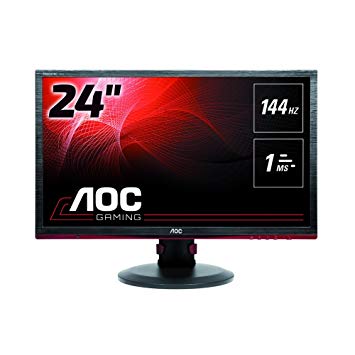
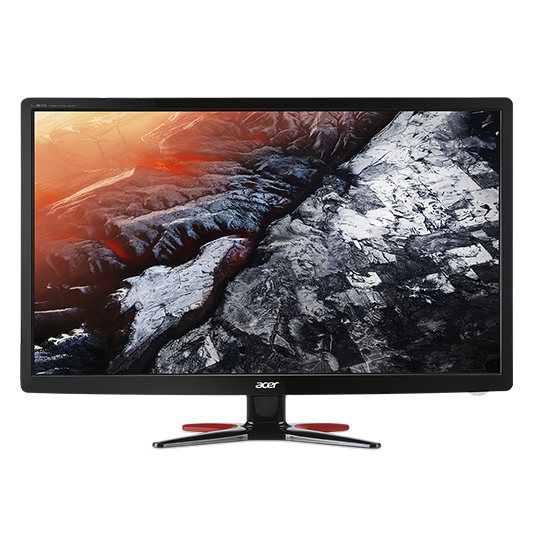
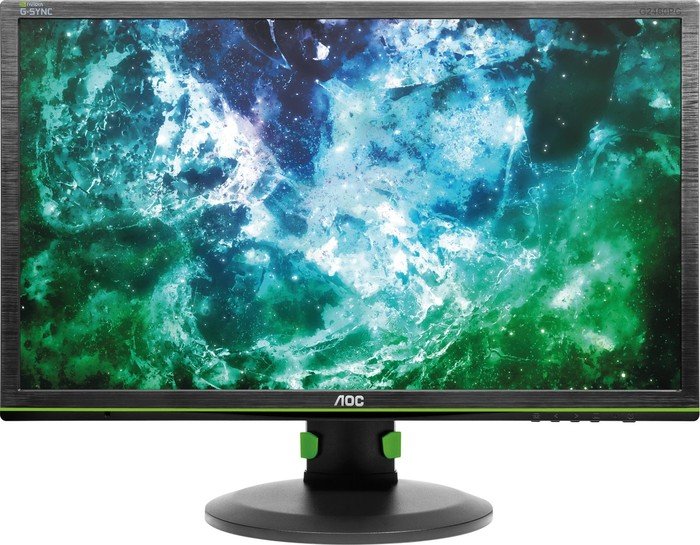
Für die durchschnittliche Antwortrate wird AOC G2460PF 3.5 ms bewertet, wodurch eine effektive Synchronisation mit der hohen Aktualisierungsrate sichergestellt wird. Der Monitor verfügt über eine VESA-Halterung. Das AOC G2460PF verfügt über den Display-Anschluss. Dies ist für die Zusammenarbeit von NVIDIA-Karten mit AMD FreeSync unerlässlich. Mit der AMD FreeSync-Unterstützung ist dieser Monitor sowohl mit AMD- als auch mit NVIDIA-Grafikkarten kompatibel. Die minimale Antwortrate von AOC G2460PF beträgt 1 ms, wodurch Geisterbilder eliminiert werden. Für die extrem schnellen Frameraten hat der AOC G2460PF eine maximale Bildwiederholfrequenz von 146 Hz, die ein flüssigeres Spiel ermöglicht. In Bezug auf die Pixeldichte hat das AOC G2460PF eine hervorragende Dichte von 91 Pixeln pro Zoll, was zu einer schärferen Text- und Bildqualität führt. Der Monitor hat ein unscheinbares Kontrastverhältnis von 1000 : 1. Der Monitor verwendet ein TN-Panel, das bei Betrachtung aus horizontalen und vertikalen Winkeln Farbverschiebungen aufweist und im Vergleich zu IPS- und VA-Panels leicht verwaschene Farben aufweist. Grafisch anspruchsvolle Spiele können Bildverluste außerhalb der adativen Bildwiederholfrequenz von 48 Hz verursachen. Für die Farbqualität von Grafiken hat das AOC G2460PF eine durchschnittliche Farbtiefe von 6 Bit, was zu geditherten Verläufen und etwas weniger genauen Farben führt. Es ist erwähnenswert, dass der AOC G2460PF ein relativ alter Monitor ist. Die Helligkeit von AOC G2460PF ist niedriger als bei anderen Monitoren. AOC G2460PF hat eine Gesamtverzögerung von 18.5 ms, was für die Konkurrenz schlecht ist.
24" AOC G2460PF Certificates, standards and licenses
Certificates, standards and licenses
CEEACENERGY STAR 6.0Epeat GoldTCO Certified Displays 6.0
24" AOC G2460PF Connectivity
Connectivity
1 x USB 2.0 (upstream) 4 x USB 2.0 (downstream) , 1 x HDMI 1.4 (MHL) , 1 x DisplayPort 1.2, 1 x DVI-D Dual Link, 1 x D-sub, 1 x 3.5 mm Audio In, 1 x 3.5 mm Audio Out
24" AOC G2460PF Dimensions, weight and color
Colors
Black
Depth with stand
244.58 mm (millimeters) 24.458 cm (centimeters) 9.6291 in (inches) 0.8024 ft (feet)
Height with stand
393.6 mm (millimeters) 39.36 cm (centimeters) 15.4961 in (inches) 1.2913 ft (feet)
Weight with stand
6.54 kg (kilograms) 14.42 lbs (pounds)
Width with stand
565.4 mm (millimeters) 56.54 cm (centimeters) 22.2598 in (inches) 1.855 ft (feet)
24" AOC G2460PF Display
Aspect ratio
1.778:116:9
Average response time
3.5 ms (milliseconds) 0.0035 s (seconds)
Backlight
W-LED
Brightness
350 cd/m² (candela per square meter)
Coating
Anti-glare/Matte (3H)
Colors
16777216 colors 24 bits
Diagonal
609.7 mm (millimeters) 60.97 cm (centimeters) 24.0039 in (inches) 2.0003 ft (feet)
Dynamic contrast
80000000 : 1
FRC
Yes
Height
298.89 mm (millimeters) 29.889 cm (centimeters) 11.7673 in (inches) 0.9806 ft (feet)
Horizontal viewing angle
170 ° (degrees)
Input lag
4 ms (milliseconds) 0.0040 s (seconds)
Minimum response time
1 ms (milliseconds) 0.0010 s (seconds)
NTSC (1953)
72 % (percent)
Panel bit depth
8 bits (6 bits + FRC)
Panel manufacturer
AU Optronics
Panel model
M240HW01 V80
Panel type
TN
Pixel density
91 ppi (pixels per inch) 36 ppcm (pixels per centimeter)
Pixel pitch
0.277 mm (millimeters) 0.0277 cm (centimeters) 0.0109 in (inches) 0.0009 ft (feet)
Resolution
1920 x 1080 pixels Full HD / 1080p
Size class
24 in (inches)
Static contrast
1000 : 1
Vertical viewing angle
160 ° (degrees)
Width
531.36 mm (millimeters) 53.136 cm (centimeters) 20.9197 in (inches) 1.7433 ft (feet)
24" AOC G2460PF Ergonomics
Backward tilt
24 ° (degrees)
Forward tilt
5 ° (degrees)
Forward/backward tilt
Yes
Height adjustment
Yes
Height adjustment range
130 mm (millimeters) 13 cm (centimeters) 5.1181 in (inches) 0.4265 ft (feet)
Landscape/portrait pivot
Yes
Left pivot
0 ° (degrees)
Left swivel
165 ° (degrees)
Left/right swivel
Yes
Removable stand
Yes
Right pivot
90 ° (degrees)
Right swivel
165 ° (degrees)
VESA interface
100 x 100 mm
VESA mount
Yes
24" AOC G2460PF Features
Features
AMD FreeSync technology, Flicker-free technology, HDCP (High-bandwidth Digital Content Protection)
24" AOC G2460PF Frequencies
Horizontal frequency (digital)
30 kHz - 160 kHz (kilohertz)
Vertical frequency (digital)
48 Hz - 146 Hz (hertz)
24" AOC G2460PF Operating and storage conditions
Operating altitude
5000 m (meters) 16404.2 ft (feet)
Operating humidity
10 % - 85 % (percent)
Operating temperature
0 °C - 40 °C (degrees Celsius) 32 °F - 104 °F (degrees Fahrenheit)
Storage altitude
12192 m (meters) 40000 ft (feet)
Storage humidity
5 % - 93 % (percent)
Storage temperature
-25 °C - 55 °C (degrees Celsius) -13 °F - 131 °F (degrees Fahrenheit)
24" AOC G2460PF Power supply and consumption
110V
100 V - 120 V (volts)
220V
220 V - 240 V (volts)
Alternating current frequency
50 Hz - 60 Hz (hertz)
Power consumption (average)
38 W (watts)
Power consumption (off)
0.3 W (watts)
Power consumption (sleep)
0.5 W (watts)
24" AOC G2460PF Gaming-Monitore - List of Max Refresh Rate Compatible GPUs
AOC G2460PF Review – Good But Complicated. by Marshall Honorof Jun 3, 2016, 3:34 PM. ... Verdict. The AOC G2460PF displays games in somewhat faithful colors at high frame rates, but cumbersome ...
Verdict The 24-inch TN category represents the best possible value in adaptive-refresh gaming monitors. AOC’s G2460PF is currently at the pinnacle, which means it’s the least-expensive ...
Conclusion. When speaking strictly of value, it’s impossible to beat most FreeSync displays. ... But for those who have spent less than $300 on a graphics board, a monitor like the G2460PF is an ...
OSD Tour AOC has one of the most efficient OSDs in the business. Everything you need comes in just five sub-menus, six if you count the analog video controls that we didn’t need to use.
AOC G2460PF Review. ... Conclusion We've come away impressed with this monitor from AOC. ... but the G2460PF doesn't suffer too badly in any one area and with a few tweaks to the OSD you'll have a ...
Conclusion With the AOC G2460PF, you can take advantage of AMD's FreeSync anti-tearing technology without spending a fortune. Its low input lag, speedy refresh rates, and multiple gaming presets ...
AOC G2460PF Review. ... It does give the G2460PF a leg up over its non-FreeSync competitors too, as variable refresh rate technology is a real benefit when playing games – it's hard to go back ...
Question aoc g2460pf monitor not switching to hdmi input
i have a brand new AOC G2460pf and when I try to switch to the hdmi input it will not select, the screen just goes to sleep. My newly built PC boots up(colors light up), video card lights up and the fan spins.
MB has only HDMI and Dvi support. The monitor only came with hdmi and display port cable. So I am only using HDMI cable as my PC has no display port.
Monitor did not come with drivers, so I assume it didn't need any and have not installed any drivers, dont know if that matters
How can I fix my monitor?
edir: it switched to hdmi , but monitor instantly went into sleep mode
00
E
enathancol7 years ago
Monitor AOC G2460PF locked at 60hz
I recently bought the AOC G2460PF 144hz Monitor because I saw all the good reviews. I've been troubleshooting for 2 days and am struggling to find a solution.
The issue is I can't set the refresh rate to anything above 60hz. The options are there to set my refresh rate to 144hz on both the Nvidia control panel and the Windows display settings, but every time it displays a black screen and reverts to 60hz. However, with a resolution of 1024x768, I can set the refresh rate to above 60hz (not over 100hz though).
I'm using a DVI Dual link cable and cannot use Display Port, HDMI or VGA due to my graphics card.
Both are for around the same price, although the ASUS would only be 75hz, however i have heard the AOC colors are bad. Also which one is the fastest (pixel,response/input).
Any owners of either or can vouch?
Also should note cant take advantage of freesync on either.
00
G
Glenwing7 years ago
The colors on the G2460PF are pretty good actually, they just have terrible looking defaults and most people don't look much into changing them.
AOC G2460PF vs BENQ ZOWIE XL2411
So thats pretty much the question, both are 144hz, the price range is about 30-40 euros so which one would u reccommend and why? I play games like pubg, cod ww2, Hunt:Showdown, LoL, Killing Floor 2.
00
G
Glenwing8 years ago
nignog1928 :
So thats pretty much the question, both are 144hz, the price range is about 30-40 euros so which one would u reccommend and why? I play games like pubg, cod ww2, Hunt:Showdown, LoL, Killing Floor 2.
The XL2411Z is a much older model and there's generally no reason to get it unless it's on a steep discount. The G2460PF has much more flexible I/O options, FreeSync, and is usually cheaper.
00
D
daryl_rd8 years ago
AOC G2460PF w/ Freesync for an Nvidia gtx 1070
Hi guys! So I was looking for a monitor that's offering a 120 hz or more for a decent -- not too expensive amount of money. Then I found this AOC G2460PF 144 hz 1080p with free-sync feature. SO as mentioned in the title, I'm pairing it with a gtx 1070 gpu (which I am completely aware of not being able to use the freesync feature that this monitor has).
I wanna ask if will there be any problem of having a nvdia gpu paired with this monitor, aside from minus-freesync? like the compatibility and stuff? will it even cause a technical problem for my rig?
Also, I wanna ask if these g-sync and freesync stuff are really necessary tools for gaming? at least for the rig that I have. Thank you guys so much!





















Was ist vor dem Kauf einer Grafikkarte zu beachten?
Wenn Sie vorhaben, Ihr System durch den Kauf einer neuen Grafikkarte zu aktualisieren. Dann sind einige wichtige Faktoren zu beachten.
Auflösung VS Qualität: Auswirkungen auf die Spieleleistung
Was beeinflusst die Spieleleistung? Klarheit oder Details?
Ultra VS High-Quality-Einstellungen in PC-Spielen
Jeder Spieler hat eine andere Vorstellung von der idealen Einstellung für PC-Spiele. In den meisten Fällen entscheiden Sie sich jedoch für eine qualitativ hochwertige Grafikkonfiguration.
Was sind CPU- oder GPU-Engpässe?
Bekommst du plötzliche Bildstürze? Sie könnten einen Engpass haben.
Was ist die akzeptable FPS-Geschwindigkeit für mich?
Bei einigen Spielen können Sie bei niedrigeren Frameraten immer noch tolle Garphics genießen.
GPU Hierarchy
GPU Compare
CPU Compare
Gaming Laptops
Gaming Monitors
Gaming Headsets
Diskussion und Kommentare
Teilen Sie Ihre Kommentare
i have a brand new AOC G2460pf and when I try to switch to the hdmi input it will not select, the screen just goes to sleep. My newly built PC boots up(colors light up), video card lights up and the fan spins.
MB has only HDMI and Dvi support. The monitor only came with hdmi and display port cable. So I am only using HDMI cable as my PC has no display port.
Monitor did not come with drivers, so I assume it didn't need any and have not installed any drivers, dont know if that matters
How can I fix my monitor?
edir: it switched to hdmi , but monitor instantly went into sleep mode
I recently bought the AOC G2460PF 144hz Monitor because I saw all the good reviews. I've been troubleshooting for 2 days and am struggling to find a solution.
The issue is I can't set the refresh rate to anything above 60hz. The options are there to set my refresh rate to 144hz on both the Nvidia control panel and the Windows display settings, but every time it displays a black screen and reverts to 60hz. However, with a resolution of 1024x768, I can set the refresh rate to above 60hz (not over 100hz though).
I'm using a DVI Dual link cable and cannot use Display Port, HDMI or VGA due to my graphics card.
The Cable I'm using:
https://www.amazon.co.uk/Feet-Cable-Benfei-DVI-D-Ferrites/dp/B07JGT83NV/ref=sr_1_22?s=electronics&ie=UTF8&qid=1547661242&sr=1-22&keywords=dual+link+dvi+cable
My Specs:
Intel i5 4690k
Gtx 760 2gb
Things I've tried:
- Reinstalling AOC monitor drivers
- Reinstalling Nvidia drivers
- Using a DVI dual link cable
I've browsed similar questions and found no solutions to my problem. The monitor works perfectly fine, I just can't set the refresh rate to 144hz.
For higher frame rates at 1080p you need Dual link DVI or Displayport connection
See page 51 and 52 of your manual for all the supported video modes:
https://www.aocmonitorap.com/upload_files/manual/G2460PF/G2460PF%20manual%20English.pdf
Maybe the DVI port on your GPU doesn't support dual link? Or the cable quality is not good. Can you borrow another cable to test?
I have connected my display with DP cable to GTX 960.
Sometimes it will shut off and will not be detected by my PC. Usually restarting the computer and the display works out, but it just does not work.
I ran out of options, what can I do?
Unplug the power to the monitor for ten seconds, then plug it back in.
https://www.amazon.com/AOC-G2460PF-1920x1080-Adjustable-DisplayPort/dp/B01BV1XBEI/ref=cm_cr_arp_d_product_top?ie=UTF8
vs
https://www.amazon.com/gp/product/B01JGYM5H6/ref=ox_sc_sfl_title_1?ie=UTF8&psc=1&smid=ATVPDKIKX0DER
Both are for around the same price, although the ASUS would only be 75hz, however i have heard the AOC colors are bad. Also which one is the fastest (pixel,response/input).
Any owners of either or can vouch?
Also should note cant take advantage of freesync on either.
The colors on the G2460PF are pretty good actually, they just have terrible looking defaults and most people don't look much into changing them.
https://linustechtips.com/main/topic/882240-best-looking-144hz-display-for-200-300/
So thats pretty much the question, both are 144hz, the price range is about 30-40 euros so which one would u reccommend and why? I play games like pubg, cod ww2, Hunt:Showdown, LoL, Killing Floor 2.
nignog1928 :
So thats pretty much the question, both are 144hz, the price range is about 30-40 euros so which one would u reccommend and why? I play games like pubg, cod ww2, Hunt:Showdown, LoL, Killing Floor 2.
The XL2411Z is a much older model and there's generally no reason to get it unless it's on a steep discount. The G2460PF has much more flexible I/O options, FreeSync, and is usually cheaper.
Hi guys! So I was looking for a monitor that's offering a 120 hz or more for a decent -- not too expensive amount of money. Then I found this AOC G2460PF 144 hz 1080p with free-sync feature. SO as mentioned in the title, I'm pairing it with a gtx 1070 gpu (which I am completely aware of not being able to use the freesync feature that this monitor has).
I wanna ask if will there be any problem of having a nvdia gpu paired with this monitor, aside from minus-freesync? like the compatibility and stuff? will it even cause a technical problem for my rig?
Also, I wanna ask if these g-sync and freesync stuff are really necessary tools for gaming? at least for the rig that I have. Thank you guys so much!