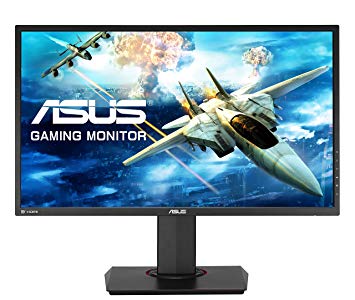
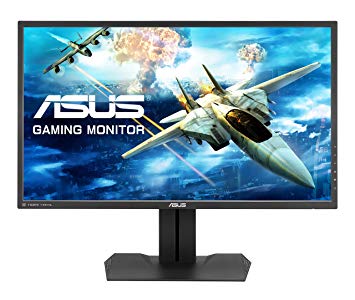
27" Asus MG278Q gaming monitor performance benchmarks
Skærmen har en VESA mount. Med hensyn til pixeldensitet har Asus MG278Q en fremragende tæthed på 109 pixel pr. Tomme, hvilket resulterer i skarpere tekst og billedkvalitet. Med AMD FreeSync-understøttelsen er denne skærm kompatibel med både AMD- og NVIDIA-grafikkort. For den gennemsnitlige svarhastighed er Asus MG278Q scorerne 4 ms, som sikrer effektiv synkronisering med den høje opdateringshastighed. For de ekstremt hurtige billedhastigheder har Asus MG278Q en maksimal opdateringshastighed på 144 Hz, der muliggør en glattere gameplay. Asus MG278Q har et samlet inputlag på 13.5 ms, hvilket er fremragende blandt konkurrencen. For grafikfarvekvalitet har Asus MG278Q en fremragende farvedybde på 8 -bit, hvilket resulterer i glattere gradienter og mere præcise farver. For at kompensere for grafisk krævende spil har Asus MG278Q en meget god lavendet adaptiv opdateringshastighed på 35 Hz, som kan tilpasse sig mere lavere billedfrekvensdråber. Minste svarfrekvens for Asus MG278Q er 1 ms, hvilket eliminerer spøgelsesvirkninger. Asus MG278Q har displayporten, og det er vigtigt for NVIDIA-kort at arbejde med AMD FreeSync. Lysstyrken på Asus MG278Q er lavere end andre skærme. Det er værd at bemærke, at Asus MG278Q er en forholdsvis gammel skærm. Skærmen har et unimpressivt kontrastforhold på 1000 : 1. Skærmen bruger et TN-panel, der lider af farveforskydning, når det ses fra vandrette og vertikale vinkler og har lidt vasket farver i forhold til IPS- og VA-paneler.
27" Asus MG278Q Certificates, standards and licenses
Certificates, standards and licenses
BSMICBCCCCEC-TickENERGY STARErPFCC Class BJ-MOSSPSERoHSUL/cULVCCIWEEEWHQL (Windows 8.1; Windows 7) CU
27" Asus MG278Q Connectivity
Connectivity
2 x USB 3.0 (downstream) , 1 x USB 3.0 (upstream) , 1 x HDMI 1.4, 1 x HDMI 2.0, 1 x DisplayPort 1.2, 1 x DVI-D Dual Link, 1 x 3.5 mm Audio In, 1 x 3.5 mm Audio Out
27" Asus MG278Q Dimensions, weight and color
Colors
Black
Depth
63 mm (millimeters) 6.3 cm (centimeters) 2.4803 in (inches) 0.2067 ft (feet)
Depth with stand
233 mm (millimeters) 23.3 cm (centimeters) 9.1732 in (inches) 0.7644 ft (feet)
Height
368 mm (millimeters) 36.8 cm (centimeters) 14.4882 in (inches) 1.2073 ft (feet)
Height with stand
563 mm (millimeters) 56.3 cm (centimeters) 22.1654 in (inches) 1.8471 ft (feet)
Weight with stand
7.65 kg (kilograms) 16.87 lbs (pounds)
Width
625 mm (millimeters) 62.5 cm (centimeters) 24.6063 in (inches) 2.0505 ft (feet)
Width with stand
625 mm (millimeters) 62.5 cm (centimeters) 24.6063 in (inches) 2.0505 ft (feet)
27" Asus MG278Q Display
Adobe RGB (1998)
72 % (percent)
Aspect ratio
1.778:116:9
Average response time
4 ms (milliseconds) 0.0040 s (seconds)
Backlight
W-LED
Brightness
350 cd/m² (candela per square meter)
Coating
Anti-glare/Matte (3H)
Colors
16777216 colors 24 bits
Diagonal
685.8 mm (millimeters) 68.58 cm (centimeters) 27 in (inches) 2.25 ft (feet)
Display area
87.09 % (percent)
Dynamic contrast
100000000 : 1
FRC
No
Height
335.664 mm (millimeters) 33.5664 cm (centimeters) 13.2151 in (inches) 1.1013 ft (feet)
Horizontal viewing angle
170 ° (degrees)
Input lag
15 ms (milliseconds) 0.0150 s (seconds)
Minimum response time
1 ms (milliseconds) 0.0010 s (seconds)
NTSC (1953)
75 % (percent)
Panel bit depth
8 bits
Panel manufacturer
AU Optronics
Panel model
M270DTN01.?
Panel type
TN
Pixel density
109 ppi (pixels per inch) 42 ppcm (pixels per centimeter)
Pixel pitch
0.233 mm (millimeters) 0.0233 cm (centimeters) 0.0092 in (inches) 0.0008 ft (feet)
Resolution
2560 x 1440 pixels Quad HD (QHD) / 1440p
Size class
27 in (inches)
Static contrast
1000 : 1
Vertical viewing angle
160 ° (degrees)
Width
596.736 mm (millimeters) 59.6736 cm (centimeters) 23.4935 in (inches) 1.9578 ft (feet)
sRGB
100 % (percent)
27" Asus MG278Q Ergonomics
Backward tilt
20 ° (degrees)
Forward tilt
5 ° (degrees)
Forward/backward tilt
Yes
Height adjustment
Yes
Height adjustment range
150 mm (millimeters) 15 cm (centimeters) 5.9055 in (inches) 0.4921 ft (feet)
Landscape/portrait pivot
Yes
Left pivot
90 ° (degrees)
Left swivel
60 ° (degrees)
Left/right swivel
Yes
Removable stand
Yes
Right pivot
0 ° (degrees)
Right swivel
60 ° (degrees)
VESA interface
100 x 100 mm
VESA mount
Yes
27" Asus MG278Q Features
Features
5-way OSD joystickAMD FreeSync technology, GamePlus (Crosshair/Timer) HDCP (High-bandwidth Digital Content Protection) Low Blue LightRefresh Rate Turbo keyTrace Free Technology
27" Asus MG278Q Frequencies
Horizontal frequency (digital)
51.2 kHz - 221.97 kHz (kilohertz)
Vertical frequency (digital)
35 Hz - 144 Hz (hertz)
27" Asus MG278Q Operating and storage conditions
Operating temperature
0 °C - 50 °C (degrees Celsius) 32 °F - 122 °F (degrees Fahrenheit)
Storage temperature
20 °C - 60 °C (degrees Celsius) 68 °F - 140 °F (degrees Fahrenheit)
27" Asus MG278Q Power supply and consumption
110V
100 V - 120 V (volts)
220V
220 V - 240 V (volts)
Alternating current frequency
50 Hz - 60 Hz (hertz)
Power consumption (average)
38.7 W (watts)
Power consumption (maximum)
45 W (watts)
Power consumption (off)
0.5 W (watts)
Power consumption (sleep)
0.5 W (watts)
27" Asus MG278Q gaming monitor performance benchmarks - List of Max Refresh Rate Compatible GPUs
Asus MG278Q gaming monitor features a stunning 27-inch quad HD display, AMD FreeSync support and a host of extras that help you in the heat of battle.
After all the tests are complete it's evident that performance differences between the MG278Q and MG279Q are fairly small. ... Asus MG278Q 27-inch QHD FreeSync Gaming Monitor Review. by Christian ...
Page 8: Conclusion; Brightness And Contrast. To read about our monitor tests in-depth, ... The MG278Q takes the win here with a tiny bit more brightness than the Acer XG270HU. This is more light ...
Asus has adopted the joystick controller on several of its models including the MG278Q. It's around back atop the other function keys. Pressing it brings up the main OSD. OSD Tour First up are the ...
Recently we checked out Asus' MG279Q, a stunning-looking 27-inch IPS gaming monitor with FreeSync, 144Hz and a premium price. Today we're reviewing a cheaper alternative -- the TN-based MG278Q.
Page 8: Conclusion Packaging, Physical Layout & Accessories The suitcase-style box protects the MG278Q with plenty of rigid Styrofoam, which should prevent damage from all but the most extreme ...
The MG278Q is in the top-tier of screens here today. It also compares well to gaming and business-class monitors as a whole. While some users complain about TN's color quality, we're not seeing ...
Our grayscale and gamma tests are described in detail here. Aside from a little red push in the higher brightness levels, Racing is a decent fire-and-forget mode for the MG278Q. We found gains ...
Nvidia driver 417.71 no working properly on Asus MG278Q
Hello guys,
I come with a problem that I am trying to fix since the launch of the driver.
As you all already know the new nvidia driver 417.71 has been launched. Gsync is now enabled for freesync displays.
I am using a Asus MG 278Q monitor with freesync. This monitor is part of the 12 Certified monitors by Nvidia.
All good on this part, the second I install the driver with ASync/Freesync enabled at some point almost the end the my pc will completely freeze.
Hmmm ook, I found a workaround, if I disable Async and try to install it, nothing happens, the installation works successfully.
Here comes the real problems, sometimes Async works without any problems when launching windows, however I encounter 3 big issues not all in the same time:
1. My monitor only displays exact half of my screen (left side is being displayed right side is completely black)
2. Similar to point 1 buuut the right side is frozen.
3. Everything is fine for around 15 seconds until my pc freezes.
My troubleshooting steps:
1. Used DDU to clean the driver and freshly install it on my PC
2. Reinstalled my OS.
3. Tried all the DP ports on GPU.
4. Used a different DP cable.
5. Tested the monitor to my xbox one S which has enabled the freesync function and there are no issues.
My PC specs:
CPU: Intel i5 4590
MOBO: AsRock h97 pro 4
GPU: Gigabyte G1 GTX 1070
RAM: Hyper X Fury blue 1600Mhz
Monitor: Asus MG278Q
If you have any suggestions please do let me know because I don't know what to do.
Probably is happening because of the driver but...one of my friends is using the same monitor and he does not have any problems.
00
S
Sohaib8 years ago
Asus PB287Q vs Asus MG278Q
Hello all, i am having an extremely difficult time between deciding these 2 monitors.
My GPU is GTX 1080 Ti. Please note i ONLY want a monitor with 1ms response time so IPS panels are NOT an option.
I really don't know much about general quality of these two. Can you tell me which of these 2 TN panels have better picture quality and/or contrast ratio?
Also if i DO buy a 4K monitor and i play some games at 1440p resolution (to get better performance) will the quality be much poorer then MG278Q (because its not the native resolution)?
00
C
Chugalug_8 years ago
Neither.
1ms response time is a bunch of marketing BS, they apply extreme overdrive settings which result in overshoot and ghosting, most '1ms' monitor are around 4-5ms anyway, the IPS 1440p 144hz monitors average about 5.
I play SC2 competitively, I can't tell any difference at all between '1ms' and 4ms if that's any extra justification.
For the first time ever i have finaly taken the step and tryed a monitor with refresh rates above 60hz.
I bought a ASUS MG278Q 144hz 1440p monitor with Freesync.
I got it connected over DP, and as my second monitor im using an old acer 60hz 1080p monitor, for watching streams etc. (The second monitor does not have freesync)
If i start a video on the second monitor, im not loosing more than 1-3 fps in my game (WoW) but freesync seems to get disabled, leaving the game more choppy, as the framerate goes up and down when you'r playing.
If i drag the video window from my second monitor, and over to my main monitor, the choppyness is gone.
I dont have any prior experience with freesync, and i did some googling but i could not find any answers. Does anyone have any experience with this?
PS: It does not happen if i just leave spotify on my second monitor.
00
C
Christopher_809 years ago
MG278Q monitor supports 144hz, only able to show up to 120hz
I recently got a display that runs 144hz. I hooked it up to my GTX760 graphics card via Display Port. When I went to change the adapter settings I could select up to 120hz, but nothing higher. I also noticed that the monitor was called a generic PNP monitor instead of by its name, making me believe there was a driver missing. Alas Asus has so drivers available for this monitor. I also downloaded the latest driver from nvidia to no avail. I swapped the monitor over to dvi to see if that works but it does not. Now I am at a loss for ideas.
CPU: I5 760 OC to 3.5 from 2.8
GPU: EVGA 760 4GB
Motherboard P7P55D-E Deluxe Asus
750W PSU
12GB Ram
and other stuff.
00
F
finoburnz22210 years ago
Asus MG278Q vs Asus MG279Q
Can someone please tell me the difference between the Asus MG278Q and the Asus MG279Q? the latter is more expensive and I would appreciate it if someone let me know why
00
H
Harraja10 years ago
The difference is that the MG278Q is a TN panel and the MG279Q is an IPS panel. If you do not know the difference here is an exert from http://www.tnpanel.com/tn-vs-ips-va/
TN
TN (Twisted Nematic) is the most common technology and also the oldest. The main advantage is that it provides the shortest response times, making them good for gaming. In combination with LED back-lighting, TN monitors also offer high brightness and draw less power than competing technologies. Another important factor is that they are cheap to manufacture, resulting in low prices for end users.
The drawbacks to the technology is the color shifts that occur at wider viewing angles. There are large differences in quality between different products, but the lower-end ones will exhibit color shift even at moderate angle changes. A TN-based display can usually be identified through these color distortions when viewing the picture from above or from the sides.
IPS
The main advantages with IPS monitors is that the technology offer noticeably better color reproduction as well as much better viewing angles. The downside used to be a difficulty to emphasize blacks, which in turn meant problems with the contrast. IPS panels were also very expensive and slow in the beginning.
Now the manufacturers have started producing so-called Super-IPS (S-IPS) panels at reasonable prices. Response times have crept down considerably and the contrast is much better. In addition, color display and the options to calibrate the colors are superior to the other panel types. IPS panels keep colors constant, even in sharp angles.


































Hvad skal du overveje, før du køber et grafikkort
Hvis du har planer om at opgradere dit system ved at købe et nyt grafikkort. Så er der nogle vigtige faktorer at overveje.
Opløsning VS Kvalitet: Indvirkning på spilytelse
Hvad påvirker spilytelsen? Klarhed eller detaljer?
Ultra VS Højkvalitetsindstillinger i PC-spil
Hver spiller har et andet begreb om den ideelle indstilling til pc-spil. Men i de fleste tilfælde vælger man en grafikkonfiguration af høj kvalitet.
Hvad er CPU eller GPU flaskehalse?
Får du pludselige rammeledninger? du har måske en flaskehals.
Hvad er den acceptable FPS-hastighed for mig?
For nogle spil kan du stadig nyde flotte gaver ved lavere billedfrekvenser.
GPU Hierarchy
GPU Compare
CPU Compare
Gaming Laptops
Gaming Monitors
Gaming Headsets
Diskussion og kommentarer
Del dine kommentarer
Hello guys,
I come with a problem that I am trying to fix since the launch of the driver.
As you all already know the new nvidia driver 417.71 has been launched. Gsync is now enabled for freesync displays.
I am using a Asus MG 278Q monitor with freesync. This monitor is part of the 12 Certified monitors by Nvidia.
All good on this part, the second I install the driver with ASync/Freesync enabled at some point almost the end the my pc will completely freeze.
Hmmm ook, I found a workaround, if I disable Async and try to install it, nothing happens, the installation works successfully.
Here comes the real problems, sometimes Async works without any problems when launching windows, however I encounter 3 big issues not all in the same time:
1. My monitor only displays exact half of my screen (left side is being displayed right side is completely black)
2. Similar to point 1 buuut the right side is frozen.
3. Everything is fine for around 15 seconds until my pc freezes.
My troubleshooting steps:
1. Used DDU to clean the driver and freshly install it on my PC
2. Reinstalled my OS.
3. Tried all the DP ports on GPU.
4. Used a different DP cable.
5. Tested the monitor to my xbox one S which has enabled the freesync function and there are no issues.
My PC specs:
CPU: Intel i5 4590
MOBO: AsRock h97 pro 4
GPU: Gigabyte G1 GTX 1070
RAM: Hyper X Fury blue 1600Mhz
Monitor: Asus MG278Q
If you have any suggestions please do let me know because I don't know what to do.
Probably is happening because of the driver but...one of my friends is using the same monitor and he does not have any problems.
Hello all, i am having an extremely difficult time between deciding these 2 monitors.
1. 27" 1440p 144hz 1ms
https://www.asus.com/Monitors/MG278Q/specifications/
2. 28" 4k 60hz 1ms
https://www.asus.com/us/Commercial-Monitors/PB287Q/specifications/
My GPU is GTX 1080 Ti. Please note i ONLY want a monitor with 1ms response time so IPS panels are NOT an option.
I really don't know much about general quality of these two. Can you tell me which of these 2 TN panels have better picture quality and/or contrast ratio?
Also if i DO buy a 4K monitor and i play some games at 1440p resolution (to get better performance) will the quality be much poorer then MG278Q (because its not the native resolution)?
Neither.
1ms response time is a bunch of marketing BS, they apply extreme overdrive settings which result in overshoot and ghosting, most '1ms' monitor are around 4-5ms anyway, the IPS 1440p 144hz monitors average about 5.
I play SC2 competitively, I can't tell any difference at all between '1ms' and 4ms if that's any extra justification.
These are the two I recommend.
https://pcpartpicker.com/product/yfx9TW/lg-27ud58-b-270-60hz-monitor-27ud58-b
https://pcpartpicker.com/product/c298TW/asus-monitor-mg279q
Hi there!
For the first time ever i have finaly taken the step and tryed a monitor with refresh rates above 60hz.
I bought a ASUS MG278Q 144hz 1440p monitor with Freesync.
I got it connected over DP, and as my second monitor im using an old acer 60hz 1080p monitor, for watching streams etc. (The second monitor does not have freesync)
If i start a video on the second monitor, im not loosing more than 1-3 fps in my game (WoW) but freesync seems to get disabled, leaving the game more choppy, as the framerate goes up and down when you'r playing.
If i drag the video window from my second monitor, and over to my main monitor, the choppyness is gone.
I dont have any prior experience with freesync, and i did some googling but i could not find any answers. Does anyone have any experience with this?
PS: It does not happen if i just leave spotify on my second monitor.
I recently got a display that runs 144hz. I hooked it up to my GTX760 graphics card via Display Port. When I went to change the adapter settings I could select up to 120hz, but nothing higher. I also noticed that the monitor was called a generic PNP monitor instead of by its name, making me believe there was a driver missing. Alas Asus has so drivers available for this monitor. I also downloaded the latest driver from nvidia to no avail. I swapped the monitor over to dvi to see if that works but it does not. Now I am at a loss for ideas.
CPU: I5 760 OC to 3.5 from 2.8
GPU: EVGA 760 4GB
Motherboard P7P55D-E Deluxe Asus
750W PSU
12GB Ram
and other stuff.
Can someone please tell me the difference between the Asus MG278Q and the Asus MG279Q? the latter is more expensive and I would appreciate it if someone let me know why
The difference is that the MG278Q is a TN panel and the MG279Q is an IPS panel. If you do not know the difference here is an exert from http://www.tnpanel.com/tn-vs-ips-va/
TN
TN (Twisted Nematic) is the most common technology and also the oldest. The main advantage is that it provides the shortest response times, making them good for gaming. In combination with LED back-lighting, TN monitors also offer high brightness and draw less power than competing technologies. Another important factor is that they are cheap to manufacture, resulting in low prices for end users.
The drawbacks to the technology is the color shifts that occur at wider viewing angles. There are large differences in quality between different products, but the lower-end ones will exhibit color shift even at moderate angle changes. A TN-based display can usually be identified through these color distortions when viewing the picture from above or from the sides.
IPS
The main advantages with IPS monitors is that the technology offer noticeably better color reproduction as well as much better viewing angles. The downside used to be a difficulty to emphasize blacks, which in turn meant problems with the contrast. IPS panels were also very expensive and slow in the beginning.
Now the manufacturers have started producing so-called Super-IPS (S-IPS) panels at reasonable prices. Response times have crept down considerably and the contrast is much better. In addition, color display and the options to calibrate the colors are superior to the other panel types. IPS panels keep colors constant, even in sharp angles.