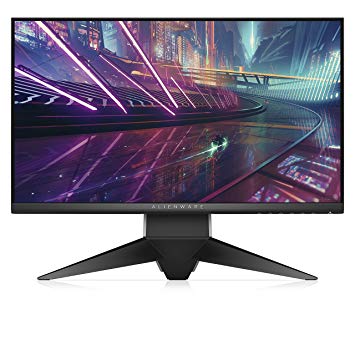
24.5" Dell Alienware AW2518H gaming monitor performance benchmarks: response, input and full specs review
To compensate for graphically demanding games, the Dell Alienware AW2518H has a very good low end adaptive refresh rate of 30 Hz that can adapt to more lower frame rate drops. The monitor has a VESA mount. In terms of pixel density, the Dell Alienware AW2518H has an excellent density of 89 pixels-per-inch, resulting in sharper text and picture quality. The Dell Alienware AW2518H has the Display Port and this is essential for NVIDIA cards to work with AMD FreeSync. The brightness of Dell Alienware AW2518H is significantly better than other monitors. Dell Alienware AW2518H has a total input lag of 13.5 ms, which is excellent among the competition. For the extremely fast frame rates, the Dell Alienware AW2518H has a maximum refresh rate of 240 Hz that allows smoother gameplay. The Dell Alienware AW2518H is a relatively new monitor. The minimum response rate of Dell Alienware AW2518H is 1 ms, which is eliminates ghosting effects. For the average response rate, the Dell Alienware AW2518H scores 4 ms, which ensures effective synchronization with the high refresh rate. Without the AMD FreeSync support, this monitor is not compatible with AMD graphics cards. The monitor uses a TN panel which suffers from color shifting when viewed from horizontal and vertical angles and has slightly washed colors compared to IPS and VA panels. For graphics color quality, the Dell Alienware AW2518H has an average color depth of 6 -bit, resulting in dithered gradients and more slightly less accurate colors. The monitor has an unimpressive contrast ratio of 1000 : 1.
1 x USB 3.0 (charge - 5V/1.5A) , 3 x USB 3.0 (downstream) , 1 x USB 3.0 (upstream) , 1 x HDMI 1.4, 1 x DisplayPort 1.2, 1 x 3.5 mm Audio In, 1 x 3.5 mm Audio Out
24.5" Dell Alienware AW2518H Dimensions, weight and color
Colors
BlackSilver
Depth
64.6 mm (millimeters) 6.46 cm (centimeters) 2.5433 in (inches) 0.2119 ft (feet)
Depth with stand
268.6 mm (millimeters) 26.86 cm (centimeters) 10.5748 in (inches) 0.8812 ft (feet)
Height
327.9 mm (millimeters) 32.79 cm (centimeters) 12.9094 in (inches) 1.0758 ft (feet)
Height with stand
418.4 mm (millimeters) 41.84 cm (centimeters) 16.4724 in (inches) 1.3727 ft (feet)
Weight
3.5 kg (kilograms) 7.72 lbs (pounds)
Weight with stand
7.14 kg (kilograms) 15.74 lbs (pounds)
Width
555.8 mm (millimeters) 55.58 cm (centimeters) 21.8819 in (inches) 1.8235 ft (feet)
Width with stand
555.8 mm (millimeters) 55.58 cm (centimeters) 21.8819 in (inches) 1.8235 ft (feet)
24.5" Dell Alienware AW2518H Display
Aspect ratio
1.778:116:9
Average response time
4 ms (milliseconds) 0.0040 s (seconds)
Backlight
W-LED
Brightness
400 cd/m² (candela per square meter)
Coating
Anti-glare/Matte (3H)
Colors
16777216 colors 24 bits
Diagonal
622.3 mm (millimeters) 62.23 cm (centimeters) 24.5 in (inches) 2.0417 ft (feet)
Display area
90.29 % (percent)
Dynamic contrast
50000000 : 1
FRC
Yes
Height
302.616 mm (millimeters) 30.2616 cm (centimeters) 11.914 in (inches) 0.9928 ft (feet)
Horizontal viewing angle
170 ° (degrees)
Minimum response time
1 ms (milliseconds) 0.0010 s (seconds)
NTSC (1953)
72 % (percent)
Panel bit depth
8 bits (6 bits + FRC)
Panel manufacturer
AU Optronics
Panel model
M250HTN01.0
Panel type
TN
Pixel density
89 ppi (pixels per inch) 35 ppcm (pixels per centimeter)
Pixel pitch
0.283 mm (millimeters) 0.0283 cm (centimeters) 0.0111 in (inches) 0.0009 ft (feet)
Resolution
1920 x 1080 pixels Full HD / 1080p
Size class
24.5 in (inches)
Static contrast
1000 : 1
Vertical viewing angle
160 ° (degrees)
Width
543.744 mm (millimeters) 54.3744 cm (centimeters) 21.4072 in (inches) 1.7839 ft (feet)
24.5" Dell Alienware AW2518H Ergonomics
Backward tilt
25 ° (degrees)
Forward tilt
5 ° (degrees)
Forward/backward tilt
Yes
Height adjustment
Yes
Height adjustment range
130 mm (millimeters) 13 cm (centimeters) 5.1181 in (inches) 0.4265 ft (feet)
Landscape/portrait pivot
Yes
Left pivot
90 ° (degrees)
Left swivel
20 ° (degrees)
Left/right swivel
Yes
Removable stand
Yes
Right pivot
90 ° (degrees)
Right swivel
20 ° (degrees)
VESA interface
100 x 100 mm
VESA mount
Yes
24.5" Dell Alienware AW2518H Features
Features
Flicker-free technology, NVidia G-SYNC Technology
24.5" Dell Alienware AW2518H Frequencies
Horizontal frequency (digital)
30 kHz - 160 kHz (kilohertz)
Vertical frequency (digital)
30 Hz - 240 Hz (hertz)
24.5" Dell Alienware AW2518H Operating and storage conditions
Operating altitude
5000 m (meters) 16404.2 ft (feet)
Operating humidity
10 % - 80 % (percent)
Operating temperature
0 °C - 40 °C (degrees Celsius) 32 °F - 104 °F (degrees Fahrenheit)
Storage altitude
12192 m (meters) 40000 ft (feet)
Storage humidity
5 % - 90 % (percent)
Storage temperature
-20 °C - 6 °C (degrees Celsius) -4 °F - 42.8 °F (degrees Fahrenheit)
24.5" Dell Alienware AW2518H Power supply and consumption
110V
100 V - 120 V (volts)
220V
220 V - 240 V (volts)
Alternating current frequency
50 Hz - 60 Hz (hertz)
Energy efficiency class
B
Power consumption (average)
26 W (watts)
Power consumption (maximum)
73 W (watts)
Power consumption (off)
0.3 W (watts)
Power consumption (sleep)
0.3 W (watts)
24.5" Dell Alienware AW2518H gaming monitor performance benchmarks: response, input and full specs review - List of Max Refresh Rate Compatible GPUs
The Alienware 25 Gaming Monitor AW2518H is the first gaming monitor from the well-known PC gaming brand, and if you’ve kitted yourself out with one of Alienware’s impressive gaming PCs, such ...
Alienware 25 Gaming Monitor AW2518H Review. ... I put the Alienware 25 Gaming Monitor AW2518H through its paces using the ... The Verdict. Alienware's first official foray into the monitor game is ...
Alienware AW2518H 240Hz G-Sync Monitor Review. ... Verdict. The Alienware AW2518H offers fantastic gaming performance with unparalleled speed and response in a 25” TN screen with FHD resolution ...
25-inch 240Hz gaming monitors are a hot property right now and no manufacturer wants to be left out. Today we’re checking out Alienware’s AW2518H.
The Alienware AW2518H is as excellent as the rest of the lot in the 1080p 240Hz segment, and the differences aren’t noticeable enough to say that one is better than the other.
The Alienware AW2518H offers fantastic gaming performance with unparalleled speed and response in a 25” TN screen with FHD resolution. While some may wish for greater pixel density, its superb ...
Alienware AW2518HF (Freesynch version) and Gsync
Hello Guys,
i have one question : Can i use Gsync with the Alienware AW2518HF ? Its 1080p and 240hz but with AMD Freesynch support. The Gsync monitor cost 200+€ more. That one cost 372€ in EU.
Now im playing with a AOC 1440p 60HZ. I want to try 144hz+ but now im asking myself, should i go back to 1080p for gaming or not... A Dell S2719DGF 1440p 155hz cost 350-400€ (not a "gaming" version). Playing games like PUBG/ Apex
So go for 1080p or 1440p?
My PC:
i5 6600 ( i will upgrade this year to i7 / zen2 )
32GB HX Predator 3600MHZ
RTX 2070 MSI Armor
Thanks!
00
A
aceofpilots7 years ago
Alienware AW2518H only allowing me 200hz but not 240hz?
I just purchased an AW2518H but I'm having issues and neither EVGA or Dell can help me
I'm using the display port and I've tried 2 cables.
I have no other displays hooked up.
I've tried using DDU and doing a clean install to the latest Nvidia Drivers
My OS is windows 7 x64 pro
I can only change the hz to 200hz in nvidia control panel as well as windows display settings with no option to force it anywhere.
please refer the spec sheets I provided.
I'm completely lost at figuring this out.
00
G
Glenwing7 years ago
It's a Kepler graphics card, it doesn't support the full bandwidth of DisplayPort 1.2. It has a maximum pixel rate of 540 Mpx/s, which is a bit below the 580 or so required for 1080p 240 Hz.
00
C
curentatu7 years ago
Alienware AW2518HF calibration settings wanted!
In the review of the Alienware AW2518H, it says that they calibrated the monitor to offer better colors but i can"t seem to find the exact settings that they used.
If someone has the exact setttings pls share them with me.
When you go to custom color you have 4 options that you can modify:
Gain, Offset, Hue, Saturation.
00
V
v.mydlar997 years ago
ALIENWARE AW2518HF not showing 240hz but only 144hz
ALIENWARE AW2518HF not showing 240hz but only 144hz with DP 1.2 monitor and my GTX 770 supports it.
00
G
Glenwing7 years ago
Can you download the custom resolution utility, find the 1080p 240 Hz listing, click edit, and show me the settings?
It might be inside the CEA extension block, like this:
EDIT: According to the manual, the 1920 × 1080 @ 240 Hz mode runs at a 594 MHz pixel clock, which is beyond the 540 MHz limit of the GTX 770.
00
P
pixqr8 years ago
Alienware AW2518H 240Hz G-Sync Problem
I recently just purchased the Alienware AW2518H and it was all going fine until I realized I wasn't using the monitor to it's full potential. When I checked how much hz my monitor was using it was set at 60, but when I tried to set it to something higher, it said the highest it could go was 60. I've been searching the web trying to find a solution, but all the methods didn't seem to work. If anyone can help me, I thank you in advance.



















What to Consider Before Buying a Graphics Card
If you have been planning to upgrade your system by purchasing a new graphics card. Then there are some important factors to consider.
Resolution VS Quality: Impact on Game Performance
What affects game performance? Clarity or Details?
Ultra VS High Quality Settings in PC Games
Every player has a different notion about the ideal setting for PC games. But in most cases, opting for a High quality graphics configuration is the way to go.
What are CPU or GPU Bottlenecks?
Are you getting sudden frame drops? you might have a bottleneck.
What is the acceptable FPS speed for me?
For some games, you can still enjoy great garphics at lower frame rates.
GPU Hierarchy
GPU Compare
CPU Compare
Gaming Laptops
Gaming Monitors
Gaming Headsets
Discussion and Comments
Share Your Comments
Hello Guys,
i have one question : Can i use Gsync with the Alienware AW2518HF ? Its 1080p and 240hz but with AMD Freesynch support. The Gsync monitor cost 200+€ more. That one cost 372€ in EU.
Now im playing with a AOC 1440p 60HZ. I want to try 144hz+ but now im asking myself, should i go back to 1080p for gaming or not... A Dell S2719DGF 1440p 155hz cost 350-400€ (not a "gaming" version). Playing games like PUBG/ Apex
So go for 1080p or 1440p?
My PC:
i5 6600 ( i will upgrade this year to i7 / zen2 )
32GB HX Predator 3600MHZ
RTX 2070 MSI Armor
Thanks!
I just purchased an AW2518H but I'm having issues and neither EVGA or Dell can help me
My GPU is an EVGA 660 SC 2gb
660 Spec sheet
Nvidia Spec sheet:
660]https://www.geforce.com/hardware/desktop-gpus/geforce-gtx-660/specifications]660
Spec sheet[/url]
Monitor spec sheet:
https://katalog.atcomp.cz/katalog/D-M-AW2518H/Dell_AW2518H.pdf
I'm using the display port and I've tried 2 cables.
I have no other displays hooked up.
I've tried using DDU and doing a clean install to the latest Nvidia Drivers
My OS is windows 7 x64 pro
I can only change the hz to 200hz in nvidia control panel as well as windows display settings with no option to force it anywhere.
please refer the spec sheets I provided.
I'm completely lost at figuring this out.
It's a Kepler graphics card, it doesn't support the full bandwidth of DisplayPort 1.2. It has a maximum pixel rate of 540 Mpx/s, which is a bit below the 580 or so required for 1080p 240 Hz.
In the review of the Alienware AW2518H, it says that they calibrated the monitor to offer better colors but i can"t seem to find the exact settings that they used.
If someone has the exact setttings pls share them with me.
When you go to custom color you have 4 options that you can modify:
Gain, Offset, Hue, Saturation.
ALIENWARE AW2518HF not showing 240hz but only 144hz with DP 1.2 monitor and my GTX 770 supports it.
Can you download the custom resolution utility, find the 1080p 240 Hz listing, click edit, and show me the settings?
It might be inside the CEA extension block, like this:
EDIT: According to the manual, the 1920 × 1080 @ 240 Hz mode runs at a 594 MHz pixel clock, which is beyond the 540 MHz limit of the GTX 770.
I recently just purchased the Alienware AW2518H and it was all going fine until I realized I wasn't using the monitor to it's full potential. When I checked how much hz my monitor was using it was set at 60, but when I tried to set it to something higher, it said the highest it could go was 60. I've been searching the web trying to find a solution, but all the methods didn't seem to work. If anyone can help me, I thank you in advance.