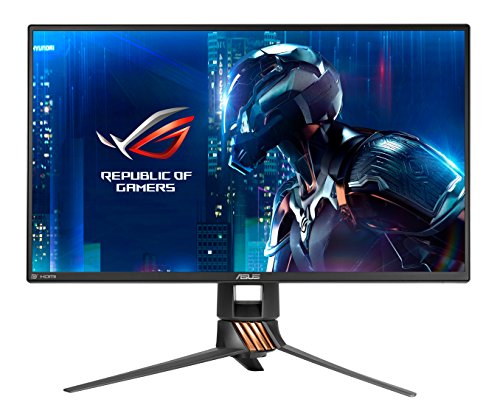
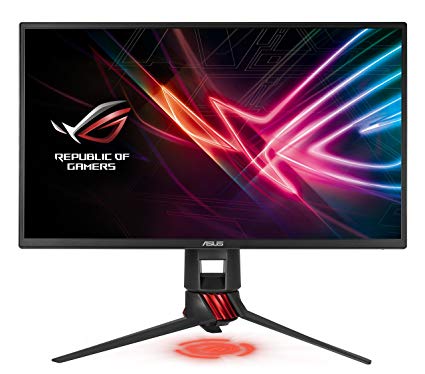
24.5" Asus RoG Swift PG258Q gaming monitor performance benchmarks: response, input and full specs review
For the average response rate, the Asus RoG Swift PG258Q scores 4 ms, which ensures effective synchronization with the high refresh rate. For the extremely fast frame rates, the Asus RoG Swift PG258Q has a maximum refresh rate of 240 Hz that allows smoother gameplay. The brightness of Asus RoG Swift PG258Q is significantly better than other monitors. The monitor has a VESA mount. The minimum response rate of Asus RoG Swift PG258Q is 1 ms, which is eliminates ghosting effects. The Asus RoG Swift PG258Q has the Display Port and this is essential for NVIDIA cards to work with AMD FreeSync. To compensate for graphically demanding games, the Asus RoG Swift PG258Q has a very good low end adaptive refresh rate of 24 Hz that can adapt to more lower frame rate drops. In terms of pixel density, the Asus RoG Swift PG258Q has an excellent density of 89 pixels-per-inch, resulting in sharper text and picture quality. Asus RoG Swift PG258Q has a total input lag of 12.5 ms, which is excellent among the competition. For graphics color quality, the Asus RoG Swift PG258Q has an average color depth of 6 -bit, resulting in dithered gradients and more slightly less accurate colors. It is worth noting that the Asus RoG Swift PG258Q is a relatively old monitor. Without the AMD FreeSync support, this monitor is not compatible with AMD graphics cards. The monitor uses a TN panel which suffers from color shifting when viewed from horizontal and vertical angles and has slightly washed colors compared to IPS and VA panels. The monitor has an unimpressive contrast ratio of 1000 : 1.
DisplayPort cable , HDMI cable USB 3.0 upstream cable
24.5" Asus RoG Swift PG258Q Additional features
Additional features
Anti-theft stand lock slot - Kensington
24.5" Asus RoG Swift PG258Q Brand, series, model
Brand
Asus
Model
RoG Swift PG258Q
24.5" Asus RoG Swift PG258Q Camera
Camera
No
24.5" Asus RoG Swift PG258Q Certificates, standards and licenses
Certificates, standards and licenses
BSMICBCCCCECEL level 1cTickCUeStandbyENERGY STARFCC Class BJ-MOSSKCCPSERCMRoHSTÜV Low Blue LightTÜV Flicker-freeUL/cULVCCIWEEEWHQL (Windows 10; Windows 8.1; Windows 7)
24.5" Asus RoG Swift PG258Q Connectivity
Connectivity
2 x USB 3.0 (downstream) , 1 x USB 3.0 (upstream) , 1 x HDMI 1.4, 1 x DisplayPort 1.2, 1 x 3.5 mm Audio Out
24.5" Asus RoG Swift PG258Q Dimensions, weight and color
Colors
Black
Depth
72.5 mm (millimeters) 7.25 cm (centimeters) 2.8543 in (inches) 0.2379 ft (feet)
Depth with stand
253.7 mm (millimeters) 25.37 cm (centimeters) 9.9882 in (inches) 0.8323 ft (feet)
Height
330.6 mm (millimeters) 33.06 cm (centimeters) 13.0157 in (inches) 1.0846 ft (feet)
Height with stand
383.7 mm (millimeters) 38.37 cm (centimeters) 15.1063 in (inches) 1.2589 ft (feet)
Weight
3.14 kg (kilograms) 6.92 lbs (pounds)
Weight with stand
5.6 kg (kilograms) 12.35 lbs (pounds)
Width
564.1 mm (millimeters) 56.41 cm (centimeters) 22.2087 in (inches) 1.8507 ft (feet)
Width with stand
564.1 mm (millimeters) 56.41 cm (centimeters) 22.2087 in (inches) 1.8507 ft (feet)
24.5" Asus RoG Swift PG258Q Display
Adobe RGB (1998)
68.1 % (percent)
Aspect ratio
1.778:116:9
Average response time
4 ms (milliseconds) 0.0040 s (seconds)
Backlight
W-LED
Brightness
400 cd/m² (candela per square meter)
Coating
Anti-glare/Matte
Colors
16777216 colors 24 bits
Diagonal
622.3 mm (millimeters) 62.23 cm (centimeters) 24.5 in (inches) 2.0417 ft (feet)
Display area
88.23 % (percent)
Dynamic contrast
50000000 : 1
FRC
Yes
Height
302.616 mm (millimeters) 30.2616 cm (centimeters) 11.914 in (inches) 0.9928 ft (feet)
Horizontal viewing angle
170 ° (degrees)
Input lag
5 ms (milliseconds) 0.0050 s (seconds)
Minimum response time
1 ms (milliseconds) 0.0010 s (seconds)
NTSC (1953)
72 % (percent)
Panel bit depth
8 bits (6 bits + FRC)
Panel manufacturer
AU Optronics
Panel model
Q250HTA00
Panel type
TN
Pixel density
89 ppi (pixels per inch) 35 ppcm (pixels per centimeter)
Pixel pitch
0.283 mm (millimeters) 0.0283 cm (centimeters) 0.0111 in (inches) 0.0009 ft (feet)
Resolution
1920 x 1080 pixels Full HD / 1080p
Size class
24.5 in (inches)
Static contrast
1000 : 1
Vertical viewing angle
160 ° (degrees)
Width
543.744 mm (millimeters) 54.3744 cm (centimeters) 21.4072 in (inches) 1.7839 ft (feet)
sRGB
100 % (percent)
24.5" Asus RoG Swift PG258Q Ergonomics
Backward tilt
20 ° (degrees)
Forward tilt
5 ° (degrees)
Forward/backward tilt
Yes
Height adjustment
Yes
Height adjustment range
120 mm (millimeters) 12 cm (centimeters) 4.7244 in (inches) 0.3937 ft (feet)
Landscape/portrait pivot
Yes
Left pivot
0 ° (degrees)
Left swivel
50 ° (degrees)
Left/right swivel
Yes
Removable stand
Yes
Right pivot
90 ° (degrees)
Right swivel
50 ° (degrees)
VESA interface
100 x 100 mm
VESA mount
Yes
24.5" Asus RoG Swift PG258Q Features
Features
5-way OSD joystickFlicker-free technology, GamePlus (Crosshair/Timer) GameVisualHDCP (High-bandwidth Digital Content Protection) Low Blue lightNVidia G-SYNC TechnologyNVidia 3D LightBoostNVidia 3D VisionNVidia ULMB (Ultra Low Motion Blur) Trace Free Technology
24.5" Asus RoG Swift PG258Q Frequencies
Horizontal frequency (digital)
30 kHz - 255 kHz (kilohertz)
Vertical frequency (digital)
24 Hz - 240 Hz (hertz)
24.5" Asus RoG Swift PG258Q Operating and storage conditions
Operating temperature
0 °C - 40 °C (degrees Celsius) 32 °F - 104 °F (degrees Fahrenheit)
Storage temperature
-20 °C - 60 °C (degrees Celsius) -4 °F - 140 °F (degrees Fahrenheit)
24.5" Asus RoG Swift PG258Q Power supply and consumption
110V
100 V - 120 V (volts)
220V
220 V - 240 V (volts)
Alternating current frequency
50 Hz - 60 Hz (hertz)
Power consumption (average)
30 W (watts)
Power consumption (eco)
18 W (watts)
Power consumption (maximum)
65 W (watts)
Power consumption (off)
0.5 W (watts)
Power consumption (sleep)
0.5 W (watts)
24.5" Asus RoG Swift PG258Q gaming monitor performance benchmarks: response, input and full specs review - List of Max Refresh Rate Compatible GPUs
HELP!! Asus Rog Swift PG258Q Turning off randomly
Please help me solve this problem. My Asus PG258 that i bought 2 years ago keeps turning off randomly but the power led light is on and the buttons are unresponsive. I tried re-plugging the outlet but it wont turn on the only way to turn on this monitor is to re-plug the ac adapter output on its back.
Note: I have 2 Asus adapters and i already tested each adapters and there's no problem on them.
00
A
alec1234567890128 years ago
ASUS ROG SWIFT PG258Q vs ASUS ROG SWIFT PG279Q
Which one should I get?
The PG279Q is my dream monitor.
1440p the perfect size, 165hz, IPS, and 4ms response time.
Problem is my computer can't run a lot of the games I play at 165 FPS at 1440p, and I know I could put it in 1080p for the time but I'm just not sure.
The PG258Q is 1080p so I could run a lot of the games at a really high FPS since it has 240hz but it is TN and I've never had a TN panel before only IPS. So I don't know really how bad the color accuracy will be.
00
F
Firecheetah138 years ago
Well, this is quite the decision. For starters, what is your GPU? Do you plan on upgrading soon? The 1440p monitor will certainly be more "futureproofed". However, if you have ONLY ever had true IPS monitors, TN is going to be a whole new beast if you are like me and are very sensitive to color. Keep in mind that you are going to have to look right at it if you want anywhere close to the colors that you are used to, but then again, you will get that sweet 1ms response. Overall: If you don't plan on upgrading your GPU anytime soon and you are using this monitor strictly for gaming, get the PG258Q. If you are expecting a GPU upgrade in the near future and you want to stick with what you are used to in terms of color and viewing angles (and you don't just game), then go with the PG279Q.
00
T
toshei8 years ago
ASUS ROG SWIFT PG258Q VS BENQ ZOWIE Shield (XL2540)
hello guys i just want to ask which is better
i have a geforece gtx 1080ti gigabyte aorus extreme edition
i don't mind the price i just want to know which is better
i play a lot of cs go ( i have a color blind sometimes) so i need a better feature or image or color etc...
TN for sure i played CSGO with the asus you are looking to buy and it had no dark corners. When you buy it make sure that you use a fullscreen white to check for stuck or dead pixels. Its quite an amount of money so dont keep a defective monitor. I changed mine 2 times. I am waiting your opinion after your first CSGO match!

















What to Consider Before Buying a Graphics Card
If you have been planning to upgrade your system by purchasing a new graphics card. Then there are some important factors to consider.
Resolution VS Quality: Impact on Game Performance
What affects game performance? Clarity or Details?
Ultra VS High Quality Settings in PC Games
Every player has a different notion about the ideal setting for PC games. But in most cases, opting for a High quality graphics configuration is the way to go.
What are CPU or GPU Bottlenecks?
Are you getting sudden frame drops? you might have a bottleneck.
What is the acceptable FPS speed for me?
For some games, you can still enjoy great garphics at lower frame rates.
GPU Hierarchy
GPU Compare
CPU Compare
Gaming Laptops
Gaming Monitors
Gaming Headsets
Discussion and Comments
Share Your Comments
Please help me solve this problem. My Asus PG258 that i bought 2 years ago keeps turning off randomly but the power led light is on and the buttons are unresponsive. I tried re-plugging the outlet but it wont turn on the only way to turn on this monitor is to re-plug the ac adapter output on its back.
Note: I have 2 Asus adapters and i already tested each adapters and there's no problem on them.
Which one should I get?
The PG279Q is my dream monitor.
1440p the perfect size, 165hz, IPS, and 4ms response time.
Problem is my computer can't run a lot of the games I play at 165 FPS at 1440p, and I know I could put it in 1080p for the time but I'm just not sure.
The PG258Q is 1080p so I could run a lot of the games at a really high FPS since it has 240hz but it is TN and I've never had a TN panel before only IPS. So I don't know really how bad the color accuracy will be.
Well, this is quite the decision. For starters, what is your GPU? Do you plan on upgrading soon? The 1440p monitor will certainly be more "futureproofed". However, if you have ONLY ever had true IPS monitors, TN is going to be a whole new beast if you are like me and are very sensitive to color. Keep in mind that you are going to have to look right at it if you want anywhere close to the colors that you are used to, but then again, you will get that sweet 1ms response. Overall: If you don't plan on upgrading your GPU anytime soon and you are using this monitor strictly for gaming, get the PG258Q. If you are expecting a GPU upgrade in the near future and you want to stick with what you are used to in terms of color and viewing angles (and you don't just game), then go with the PG279Q.
hello guys i just want to ask which is better
i have a geforece gtx 1080ti gigabyte aorus extreme edition
i don't mind the price i just want to know which is better
i play a lot of cs go ( i have a color blind sometimes) so i need a better feature or image or color etc...
benq:
https://www.amazon.com/BenQ-eQualizer-Adjustable-Vibrance-XL2540/dp/B01MCYUV19/ref=sr_1_1?ie=UTF8&qid=1500639874&sr=8-1&keywords=240hz
Asus:
https://www.amazon.com/PG258Q-G-SYNC-eSports-Gaming-Monitor/dp/B06WRP3F5S/ref=sr_1_2?ie=UTF8&qid=1500639874&sr=8-2&keywords=240hz
TN for sure i played CSGO with the asus you are looking to buy and it had no dark corners. When you buy it make sure that you use a fullscreen white to check for stuck or dead pixels. Its quite an amount of money so dont keep a defective monitor. I changed mine 2 times. I am waiting your opinion after your first CSGO match!