NVIDIA TITAN Xp
vs
AMD Radeon R9 295X2
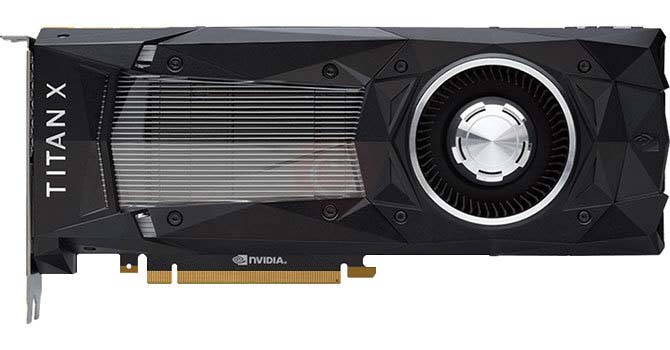

NVIDIA TITAN Xp
For 1080p Full HD, we were able to play Hogwarts Legacy, A Plague Tale: Requiem, Dead Space, God of War, Forza Horizon 5 at 61 fps to 72 fps and kept frame rates hovering around 69 fps. For 1440p Quad HD, we were able to play Call of Duty: Modern Warfare II, God of War, Forza Horizon 5, Metro Exodus, Assassin's Creed Odyssey at 61 fps to 66 fps and kept frame rates hovering around 63 fps.
For 2160p 4K, we were able to play Strange Brigade, Resident Evil 2, Far Cry New Dawn, Spider-Man Remastered, Far Cry 5 at 62 fps to 66 fps and kept frame rates hovering around 64 fps.
AMD Radeon R9 295X2
Compared to its NVIDIA 's closest rival, GTX TITAN X, the R9 295X2 was 3.3 % faster. For 1080p Full HD, we were able to play Borderlands 3, Dying Light 2, Total War: Warhammer III, Monster Hunter: World, Anthem at 61 fps to 64 fps and kept frame rates hovering around 63 fps.
For 1440p Quad HD, we were able to play Hitman 3, Guardians of the Galaxy, GreedFall, Death Stranding, F1 2019 at 61 fps to 69 fps and kept frame rates hovering around 64 fps. For 2160p 4K, we were able to play Overwatch 2, Valorant at 66 fps to 138 fps and kept frame rates hovering around 102 fps.
Game Performance at selected quality settings
Change Quality Settings
1920x1080
2560x1440
3440x1440
| Year | Game | Frames Per Second |
|---|---|---|
| 2019 | Apex Legends |
|
| 2019 | Anthem |
|
| 2019 | Far Cry New Dawn |
|
| 2019 | Resident Evil 2 |
|
| 2019 | Metro Exodus |
|
| 2019 | World War Z |
|
| 2019 | Gears of War 5 |
|
| 2019 | F1 2019 |
|
| 2019 | GreedFall |
|
| 2019 | Borderlands 3 |
|
| 2019 | Call of Duty Modern Warfare |
|
| 2019 | Red Dead Redemption 2 |
|
| 2019 | Need For Speed: Heat |
|
| 2018 | Just Cause 4 |
|
| 2018 | Monster Hunter: World |
|
| 2018 | Strange Brigade |
|
| 2017 | Need For Speed: Payback |
|
| 2017 | For Honor |
|
| 2017 | Project CARS 2 |
|
| 2017 | Forza Motorsport 7 |
|
| 2016 | Dishonored 2 |
|
| 2015 | Grand Theft Auto V |
|
| 2015 | Rocket League |
|
| 2015 | Need For Speed |
|
| 2015 | Project CARS |
|
| 2015 | Rainbow Six Siege |
|
| 2012 | Counter-Strike: Global Offensive |
|
| 2009 | League of Legends |
|
3840x2160
NVIDIA TITAN Xp / i7-7700K
In terms of cost, pricing clearly is a genuine issue here and the price of TITAN Xp is simply ridiculous. For those on 1080p or even 1440p monitors, the TITAN Xp is very expensive and there are better value choices in the short term. It is worth noting that the TITAN Xp is a very power hungry card and requires a decent power supply unit. In terms of memory, the TITAN Xp 's 12288 MB RAM is more than enough for modern games and should not cause any bottlenecks. 4K gaming is joyous on this TITAN Xp , and with a little tweaking to your AA settings, it'd be hard to imagine a title not capable of 60 fps on average.AMD Radeon R9 295X2 / i7-4770K
In terms of cost, pricing clearly is a genuine issue here and the price of R9 295X2 is simply ridiculous. For those on 1080p or even 1440p monitors, the R9 295X2 is very expensive and there are better value choices in the short term. It is worth noting that the R9 295X2 is a very power hungry card and requires a decent power supply unit. This combination between R9 295X2 and Intel Core i7-4770K @ 3.50GHz has less than 8% bottleneck in many games and is perfect match to avoid FPS loss. In short the performance is exceptional, there's no question that this is one of the most powerful single GPU out there in 2026 . This combination between R9 295X2 and Intel Core i7-4770K @ 3.50GHz is a perfect match to avoid FPS loss. With current 4096 MB RAM, the R9 295X2 can have very few memory-related bottlenecks in more modern games.TITAN Xp vs R9 295X2 Specifications Comparison
Board Design
| TITAN Xp | R9 295X2 | |
|---|---|---|
| Length | 10.5 inches 267 mm | 12.08 inches 307 mm |
| Outputs | 1x HDMI3x DisplayPort | 1x DVI4x mini-DisplayPort |
| Power Connectors | 1x 6-pin + 1x 8-pin | 3x 8-pin |
| Slot Width | Dual-slot | Dual-slot |
| TDP | 250 W | 500 W |
Clock Speeds
| TITAN Xp | R9 295X2 | |
|---|---|---|
| GPU Clock | 1405 MHz | 1018 MHz |
| Memory Clock | 1426 MHz 11408 MHz effective | 1250 MHz 5000 MHz effective |
Graphics Card
| TITAN Xp | R9 295X2 | |
|---|---|---|
| Bus Interface | PCIe 3.0 x16 | PCIe 3.0 x16 |
| Generation | GeForce 1000 | Volcanic Islands (R9 200) |
| Launch Price | 1,199 USD | 1,499 USD |
| Production | Active | End-of-life |
| Release Date | Apr 6th, 2017 | Apr 29th, 2014 |
Graphics Features
| TITAN Xp | R9 295X2 | |
|---|---|---|
| DirectX | 12.0 (12_1) | 12.0 (12_0) |
| OpenCL | 1.2 | 2 |
| OpenGL | 4.6 | 4.5 |
| Shader Model | 6.1 | 6 |
| Vulkan | 1.1.82 | 1.1.82 |
Graphics Processor
| TITAN Xp | R9 295X2 | |
|---|---|---|
| Architecture | Pascal | GCN 2.0 |
| Die Size | 471 mm² | 438 mm² |
| GPU Name | GP102 | Vesuvius |
| GPU Variant | GP102-450-A1 | Vesuvius XT (215-0852022) |
| Process Size | 16 nm | 28 nm |
| Transistors | 11,800 million | 6,200 million |
Memory
| TITAN Xp | R9 295X2 | |
|---|---|---|
| Bandwidth | 547.6 GB/s | 320.0 GB/s |
| Memory Bus | 384 bit | 512 bit |
| Memory Size | 12288 MB | 4096 MB |
| Memory Type | GDDR5X | GDDR5 |
Render Config
| TITAN Xp | R9 295X2 | |
|---|---|---|
| ROPs | 96 | 64 |
| Shading Units | 3840 | 2816 |
| TMUs | 240 | 176 |
Theoretical Performance
| TITAN Xp | R9 295X2 | |
|---|---|---|
| FP32 (float) performance | 12,150 GFLOPS | 5,733 GFLOPS |
| FP64 (double) performance | 379.7 GFLOPS (1:32) | 716.7 GFLOPS (1:8) |
| Pixel Rate | 151.9 GPixel/s | 65.15 GPixel/s |
| Texture Rate | 379.7 GTexel/s | 179.2 GTexel/s |
What to Consider Before Buying a Graphics Card
If you have been planning to upgrade your system by purchasing a new graphics card. Then there are some important factors to consider.
Resolution VS Quality: Impact on Game Performance
What affects game performance? Clarity or Details?
Ultra VS High Quality Settings in PC Games
Every player has a different notion about the ideal setting for PC games. But in most cases, opting for a High quality graphics configuration is the way to go.
What are CPU or GPU Bottlenecks?
Are you getting sudden frame drops? you might have a bottleneck.
What is the acceptable FPS speed for me?
For some games, you can still enjoy great garphics at lower frame rates.
GPU Hierarchy
GPU Compare
CPU Compare
Gaming Laptops
Gaming Monitors
Gaming Headsets
Discussion and Comments
Share Your Comments